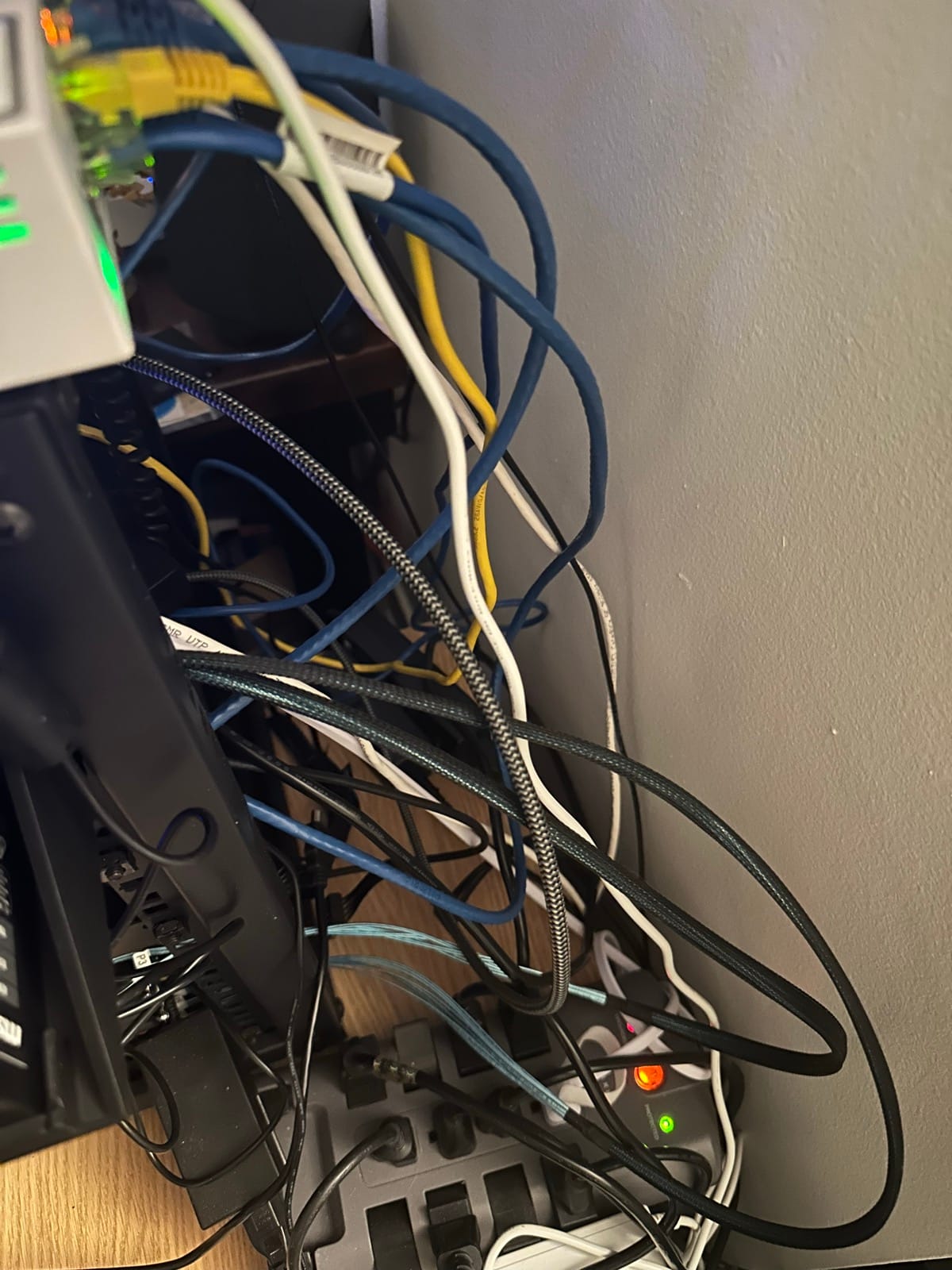
I've had this rack for quite a while, but I've never written about it, because it never got to a point I was proud to show off. It still hasn't, as the photo of the back further down makes clear. It's close enough to start, though.
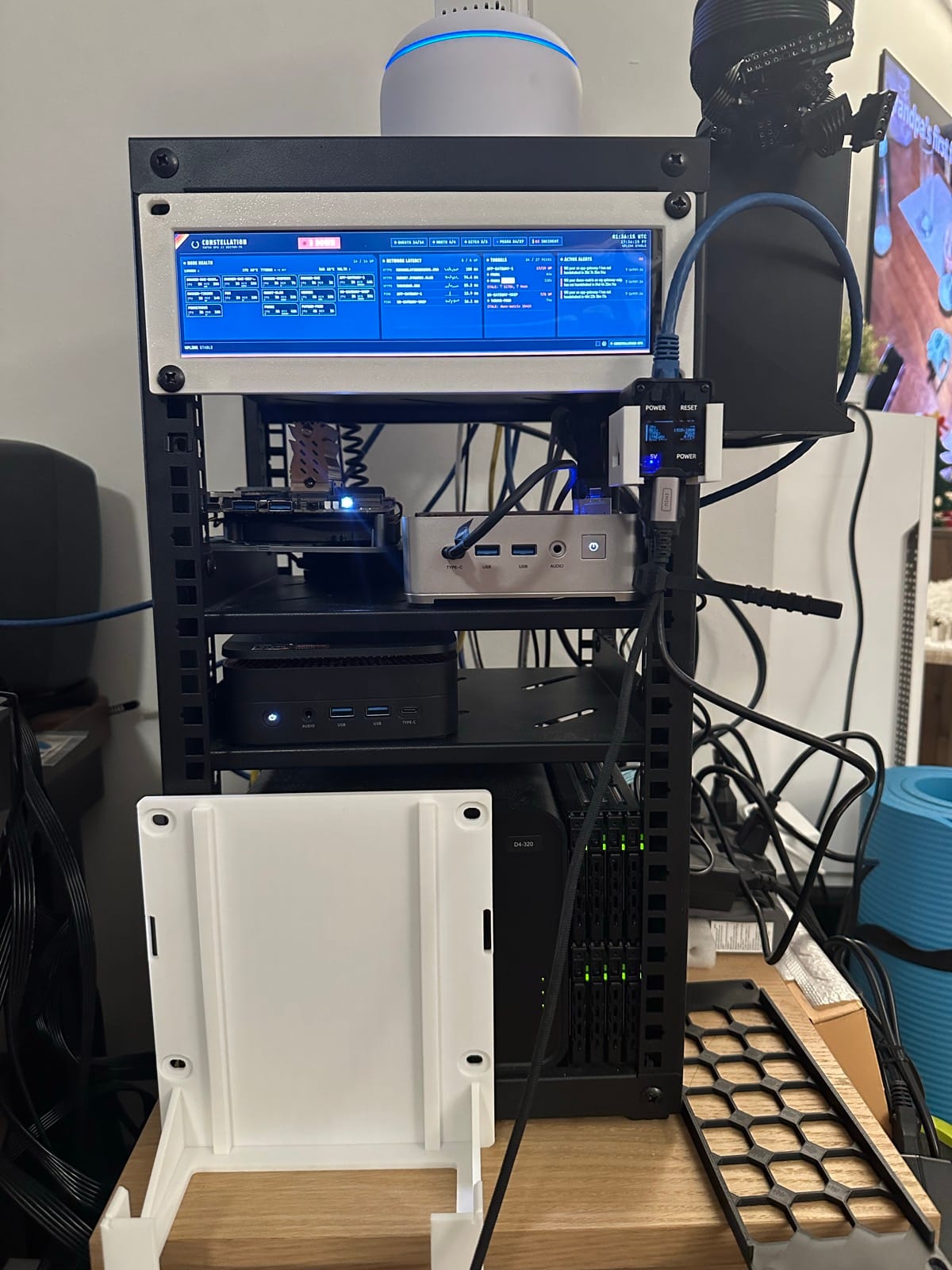
It's an unusual rack. It's rectangular, so the inside is squared off, and as well as the usual front and back posts it has posts along the sides. The side posts are where I hang equipment that won't fit on a shelf, like the power supply on its 3D-printed holder. The NanoKVM sits on another printed holder on the front post. And yes, you saw that right: this 10-inch rack takes regular cage nuts, and I have plenty of those.
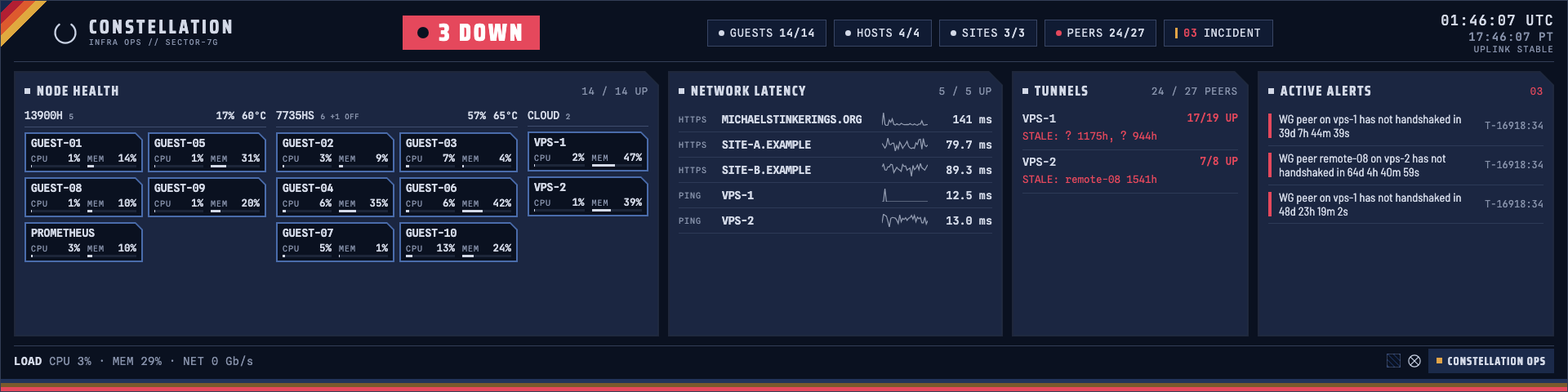
For most of this year my homelab grew the usual way: a new box for each new job, and an older box that never quite got retired. In early November I did the opposite for once. I moved work onto the two most efficient machines I own, and powered things off.
The two machines are wcl304, a Kamrui P2 with Intel's new Core 3 304 (Wildcat Lake), and 7735hs, a Kamrui Hyper H1 with a Ryzen 7 7735HS. The biggest change is that my Unraid NAS now runs as a virtual machine on wcl304, a 15 W mini PC, alongside Jellyfin with hardware AV1 encode and decode. The old n1pro is retired, and the i9-13900H box that used to carry Unraid may be next.
This isn't a guide. It's what I moved, what I measured, and the one dumb mistake that cost me most of a day.
Unraid in a VM on a 15 W mini PC
Unraid used to run as a VM on the 13900H, and it was the biggest tenant there: about 10 GB of RAM pinned for good, because a VM with a passed-through device can't balloon. That box has been short on memory for months, so moving Unraid out was the obvious fix.
The P2 has a second M.2 slot, and that's what made the move possible:
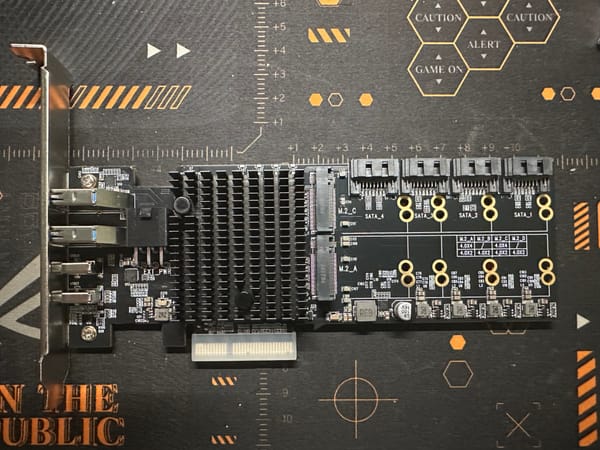
- Disk controller: a small M.2 SATA card (Realtek RTL9101) sits in the second slot and is passed straight through to the Unraid VM. It runs my SSD cage.
- Bulk disks: a TerraMaster D4-320 four-bay DAS on the P2's 10 Gbps USB-C port, with each drive passed through to the VM.
- Boot flash: Unraid boots from a USB stick its license is tied to. Mine is no longer a physical stick. More on that below.
The VM gets 4 of the P2's 5 cores and 7 GB of its 12 GB. Jellyfin (2 GB) and my secondary DNS server (512 MB) share the rest. It's tight, and the soldered 12 GB is the one thing I'd change about this machine.
Booting without the USB stick
Unraid ties its license to the GUID of the USB stick it boots from. The usual way to run it in a VM is to pass a real stick through to the guest, and Unraid's documentation says the newer TPM-based licensing isn't supported when Unraid runs as a VM. So a virtualized Unraid is stuck depending on a physical flash drive. Honestly, I think that's a silly rule. The whole point of a VM is to get away from that kind of dependency.
It also stopped being theoretical for me. Back in June my Unraid stick started dying, and I managed to rescue a full image of it before it got worse.
So now there's no stick at all. Unraid boots from that rescued image, with my own Pro license, on one running instance. I'm deliberately not explaining how. This isn't a guide, and I don't want it used to dodge paying for Unraid, which is worth paying for.
It has trade-offs. It's unsupported, and any Unraid update could break it, so I keep the image backed up and a fallback ready. And that image file is now the most important file in the house: it holds the license and the whole Unraid config. That turned out to matter in the brick incident below.
Jellyfin with AV1
Jellyfin moved over the same day. It had been running on a slice of the 13900H's iGPU, which can't encode AV1 at all. The Core 3 304's Xe3 graphics can do H.264, HEVC and AV1, both encode and decode. I tested it with a full 1080p 10-bit HEVC episode, decoded, scaled and re-encoded entirely on the GPU:
| Encoder | wcl304 (Xe3) | 13900H (Xe-LP slice) |
|---|---|---|
| H.264 | 416 fps | 248 fps |
| HEVC | 546 fps | not tested |
| AV1 | 504 fps | not supported |
That's roughly 20x realtime for AV1 on a 15 W chip. Jellyfin now gets the whole GPU instead of a slice of it, since nothing else on this box needs graphics.
The 7735HS picks up the rest
The 7735hs was already doing the most work. At the end of August it took over everything from n1pro, an older mini PC on a no-name SSD I didn't trust. In November it also became the home of two shared pieces:
- Primary DNS. My Technitium DNS server moved back to the 7735hs once the box had gone over a month without a crash. More on those crashes below. The old copy on n1pro, and now wcl304, stays as the secondary.
- One reverse proxy for everything. A single Caddy container gives every web UI in the house a proper HTTPS name, so I no longer click through certificate warnings or type IP addresses.
It now runs 19 guests: Home Assistant, Gitea (which hosts my notes), my blog, the local Nest thermostat bridge, monitoring, a PXE boot server, and a handful of small web projects. The load average sits around 1.3 on 16 threads.
The 7735hs wasn't always trustworthy. In September it kept freezing, and the freezes turned out to be kernel panics, with the traces saved in the firmware's crash store. Disabling the deepest CPU sleep state (C3) stopped them. I can't say for sure that's the root cause, but it has run 18 days since its last planned reboot, and longer before that, without a panic.
The power numbers
This is the part that surprised me. On a normal afternoon, with Unraid, Jellyfin and DNS all running, the Core 3 304 package draws about 2 W. These are CPU package readings from all three hosts, taken in the same minute:
| Host | What it runs | CPU package power |
|---|---|---|
| wcl304 (Core 3 304) | Unraid VM, Jellyfin, secondary DNS | ~2 W |
| 7735hs (Ryzen 7 7735HS) | 19 guests | ~9 W |
| 13900h (i9-13900H) | 8 containers, including backups and photos | ~10 W |
Package power isn't wall power, so here are the wall numbers from when I reviewed the P2: 5.6 W idle, the lowest of any machine I've measured, and 37.9 W at its absolute peak. Tone-mapping 4K HDR down to 1080p added only about 6 W over idle. At my electricity rate (about $0.315/kWh once tiers are counted), 5.6 W around the clock is roughly $15 a year.
One honest caveat: the disks aren't in those numbers. The DAS has its own power supply, and the SSD cage runs off another machine's PSU. Spinning drives cost what they cost wherever they're plugged in. What changed is the computer in front of them, and that went from an i9 to something that idles like a phone charger.
I also went into this assuming the homelab was why my power bill doubled this summer. It wasn't. When I pulled the data, the jump lined up with the air conditioning automation I set up in July, not with the servers. The lab has sat at roughly the same draw all year, and now it's heading down.
What went wrong
I used the wrong power brick. When I set up the P2, I plugged it into the brick from the n1pro I'd just retired. They look alike, but that brick was 12 V and the P2 wants 19 V. It booted and idled happily. Then, as soon as Unraid imported its pools and the CPU and disks got busy together, it froze hard: no log, no crash dump, the network port dead. That happened five times out of five.
I spent hours on software theories first: PCIe power saving on the SATA card, IOMMU groups, GPU virtualization, CPU sleep states. None of it was the problem. On the right brick, I ran ten minutes of all cores at 100% while reading almost a terabyte through the SATA card, and it didn't blink. It has now been up for 17 days straight. My new rule: when a new box freezes without leaving any trace, check the power brick's voltage before anything else.
The crashes damaged Unraid's config. Each hard freeze caught the boot flash mid-write, and Unraid came back with its pools unassigned and SSH turned off. Patching it by hand would have been guesswork, so I restored a clean flash image I'd saved from the old host. One SSD in the cache pool had fallen behind and needed a resilver (9.4 GB, zero errors), and I ran a full parity check afterwards to be safe.
Two smaller gotchas, in case they save someone an evening:
- On the first try, splitting the Xe3 GPU into virtual slices crashed the kernel. Booting with
iommu=ptfixed it. In the end I didn't use slices at all, since Jellyfin is the only thing that needs the GPU. - If you pass the whole Intel GPU into a container, keep its render device's real name. Mapping it in under a different name made the media driver fail with a confusing display error.
Where Project Solaris fits
This move ties straight into Project Solaris, the power distribution board I've been building. Its goal is to replace the pile of wall warts behind the rack with one PC power supply feeding many outputs, each one monitored.
The brick mix-up is the best argument I have for it. Every mini PC ships with its own brick, they all look the same, and nothing stops you from plugging a 19 V machine into a 12 V supply. The retired n1pro ran on 12 V. The P2 wants 19 V. With a single power supply and labelled outputs, there's one place to check instead of a drawer of look-alike bricks.
It also fixes the caveat in my power numbers. The figures above are CPU package readings plus an old wall measurement, because I have no per-device metering. Solaris measures current and power on every output, so each machine's real draw would show up all the time, not just when I remember to put a meter on it. That's how I'd find out what retiring the 13900H actually saves.
The catch is voltage. The current board, v3, has two 12 V outputs and one 5 V output, so it can't power the P2 on its own. For now the plan is an off-the-shelf 12 V to 20 V boost converter hung off one of the 12 V outputs. It works, but it's a separate module with its own wiring, and that's exactly the kind of clutter Solaris is supposed to remove. So it's a stopgap for proving the concept, not the finished product. The 20 V stage will eventually be built into the board.
The stopgap is really there for design validation. A mini PC running all day is a realistic, steady load, and I want to measure:
- Temperature rise on 2 oz copper. How warm do the power traces and connectors get under sustained current?
- Whether the eight-output version needs four layers. A bigger board carries more total current, and I'd rather learn from measurements than guess.
Each output is fused at 15 A, though I expect the board itself can carry well beyond that. I plan to push test boards right up to the point of failure to find out where the real safety margin is. That's the number I want in hand before anyone else plugs a homelab into one.
A low-power homelab like this one is what I'm designing Solaris for: lots of small devices, all on 24/7, where a few watts per device adds up.
Is the 13900H next?
Probably. With Unraid and Jellyfin gone, the 13900H is down to eight containers:
- Proxmox Backup Server, which backs up every other host. Its datastore already lives on Unraid over the network, so the server itself is light.
- Immich, my photo library. Its machine-learning jobs already run on the RTX 3090 in another box.
- Monitoring: Prometheus, InfluxDB and Grafana.
- A couple of small work containers.
None of that needs an i9. The rough plan is to move backups to the 7735hs and the rest to my BD795i node, which is on all the time anyway because of the GPU. My estimate is 30 to 45 W saved at the wall. That's a guess until I measure it, and I'll post the real number if I do it.
The real limit is RAM
What decides where things can go is memory, not CPU. Both machines have soldered RAM: 24 GB on the 7735hs and 12 GB on wcl304, and neither can be upgraded. Here's how they looked this afternoon:
| Host | RAM in use | Load average |
|---|---|---|
| wcl304 | 9.4 of 11.4 GB (about 2 GB left) | 0.2 on 5 cores |
| 7735hs | 13.3 of 22.8 GB (about 10 GB left) | 1.3 on 16 threads |
wcl304 is effectively full, and its CPU is barely awake. The 7735hs has room for a few more small containers, but not for Immich, which needed 14 GB before it stopped running out of memory while generating thumbnails. That's why the 13900H's workloads are headed mostly to the BD795i and not to these two. On every low-power box I own, memory will run out long before the CPU becomes a bottleneck.
What I'm actually learning is simple: the newest low-power chips are good enough that the expensive box doesn't need to be the one running around the clock. A 15 W part with a modern media engine now runs my NAS and my media server. The lesson for the next purchase is to buy for RAM first. With soldered memory, the capacity you buy on day one is the capacity you keep.
Next: bare boards on carriers
The next big improvement is physical. These mini PCs take up a lot of rack space lying flat in their cases, and the cases won't let them stand on edge. So the plan is to take the motherboards out of their cases. Each board bolts to its own 3D-printed carrier, and the carriers slide into a printed base in the 10-inch rack, standing on edge. Three boards fit in the width that one used to take lying down.
The boards make this easier than I expected: every one of them uses the same 120 mm fan square mounting pattern, and I checked each against the real hardware. Each carrier slides into a dovetail groove and clicks into place with a latch, so a board comes out without tools. The base has a vented floor so air can move up past the boards.
The big open question is orientation. Some boards have the CPU cooler on the back, others on the front. Ideally every board would mount with its cooler facing the same way, so one carrier design fits all of them and the airflow is the same in every bay. Whether flipping a board to get there actually works is the part I don't know yet: ports, the power jack and the cooler height all have to fit the space on either side. It's designed but not printed, and the first prints will be small test pieces to dial in the slide and the latch while I work that out.
Cable management: an openGrid panel
One piece is already printed: a 2U openGrid panel for the back of the rack. openGrid is an open-source wall-grid system, and its Lite version is thin enough to fit in a rack faceplate. The panel bolts to the rear rails, cables pass through the open cells, and openGrid clips, Velcro anchors and other accessories snap into the grid wherever they're needed. Seven cells across is the most that fits between the rails of a 10-inch rack.
This will be the rack's cable management system. I'm also thinking about an openGrid-compatible mount for a 120 mm exhaust fan, so the same grid can pull warm air out past the boards.