Disclosure: Lekuo provided this card free of charge. No money changed hands in either direction. There were no conditions attached to what I publish: no approval rights over the draft, no direction on the conclusion, and no involvement in how it was tested or what was measured. I have worked with Lekuo for a long time and have reviewed a number of their products here, so read both the criticism and the praise with that relationship in mind. For whatever it is worth, the arrangement did not stop me from devoting a section to the card silently destroying a storage array when you forget its power connector, and every number below is reproducible from the raw data and test harness I have published.
Expansion cards that add storage usually do one of two things. Either they are a PCIe switch, which costs real money and needs a big slot, or they are a passive bifurcation riser, which needs a motherboard willing to split its lanes and quietly fails on the many that will not. The Lekuo SouthBridge Max PCIe 4.0 Multi-Function Expansion Card does neither. It takes an actual AMD B650 chipset, the same Promontory 21 die that sits on retail motherboards, and puts it on a PCIe 4.0 x4 card.
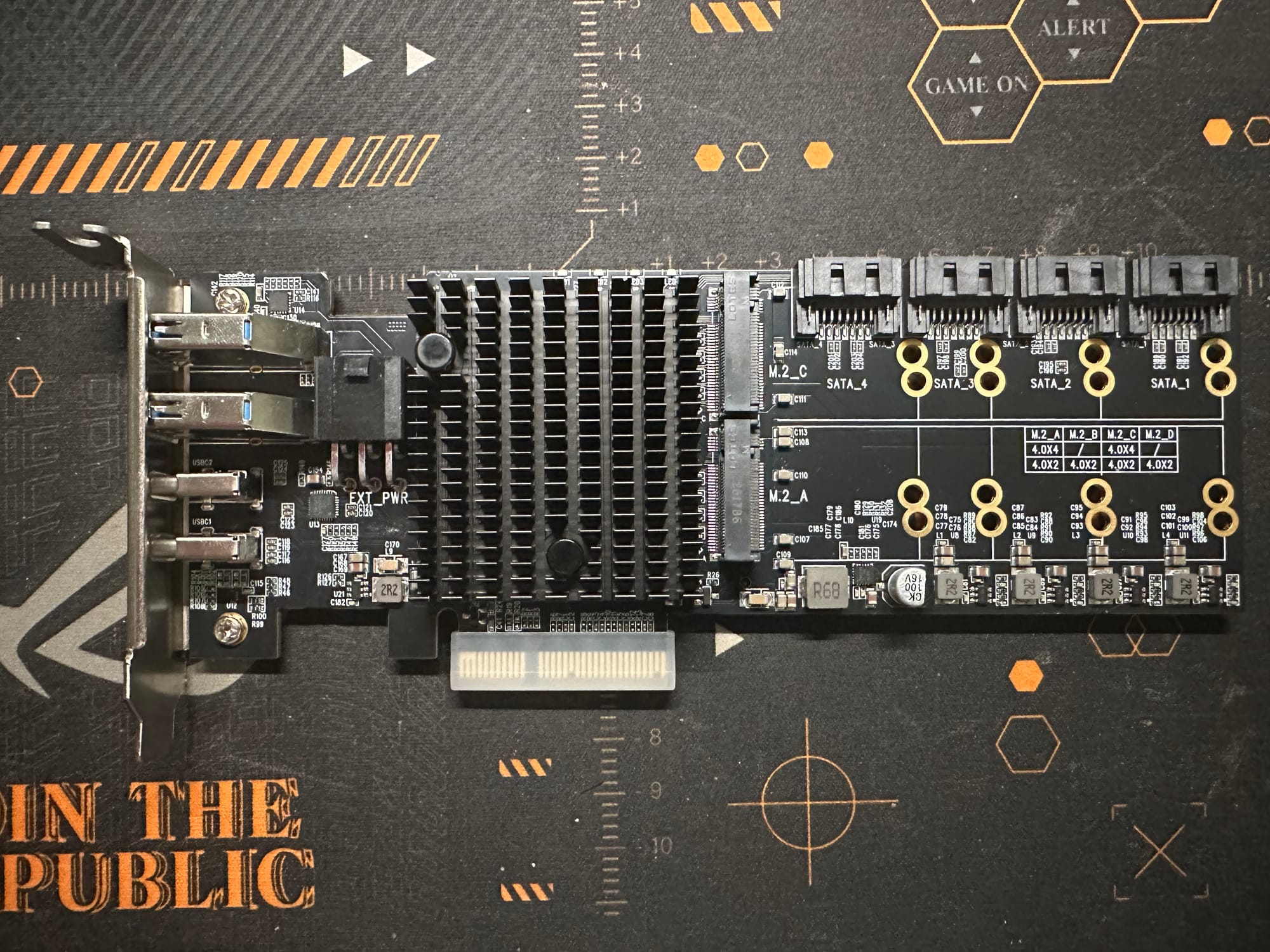
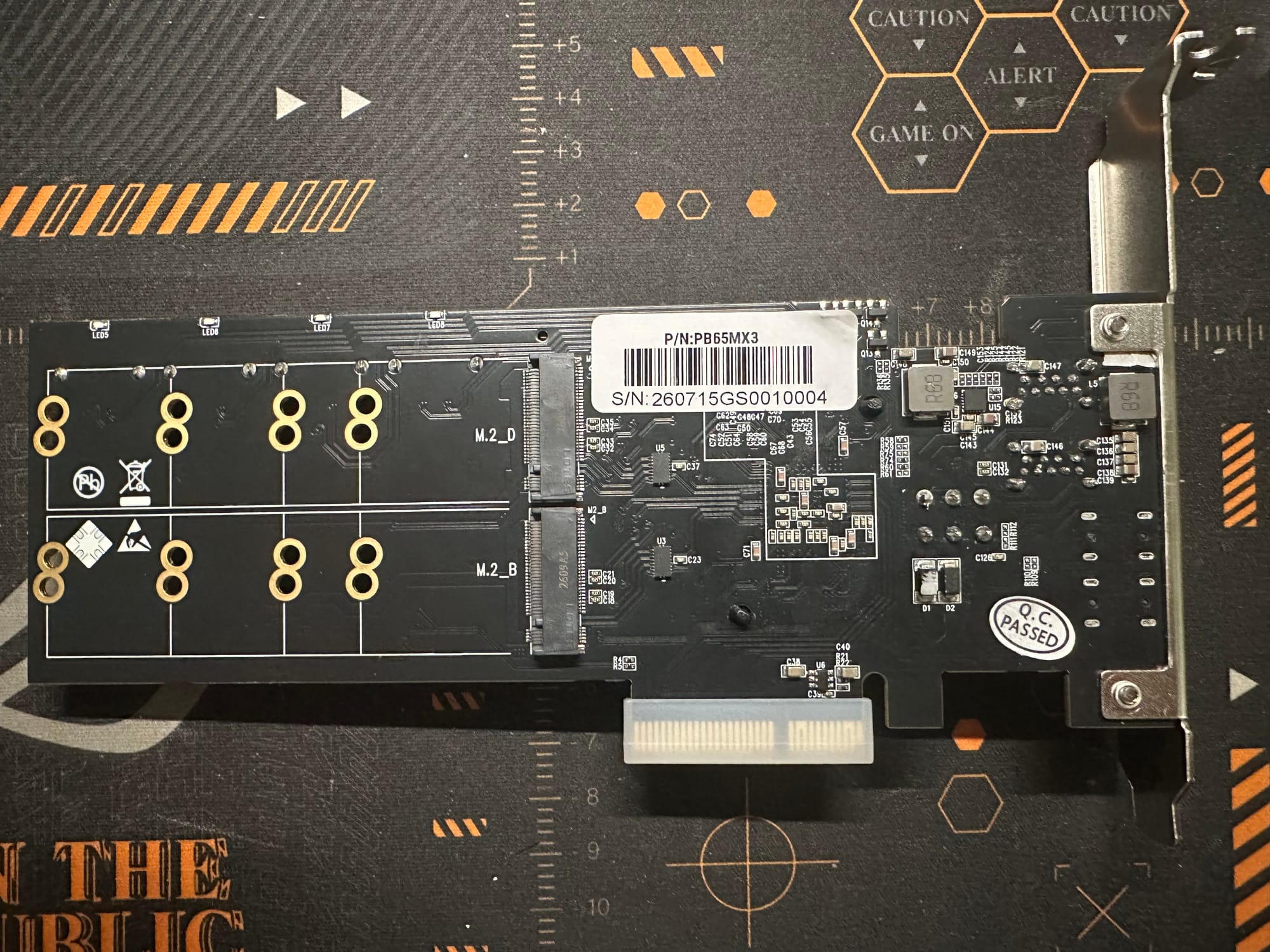
The name is not going to win anything. But I will give them this: "SouthBridge" is the most accurate product name I have typed in a while, because that is exactly what the card is, a southbridge on a stick. Every other manufacturer would have called it the StorageBeast Pro X. The "Max" is doing nothing, and I hope the next one gets a better name, but I would rather have a boring name that describes the product than an exciting one that does not.
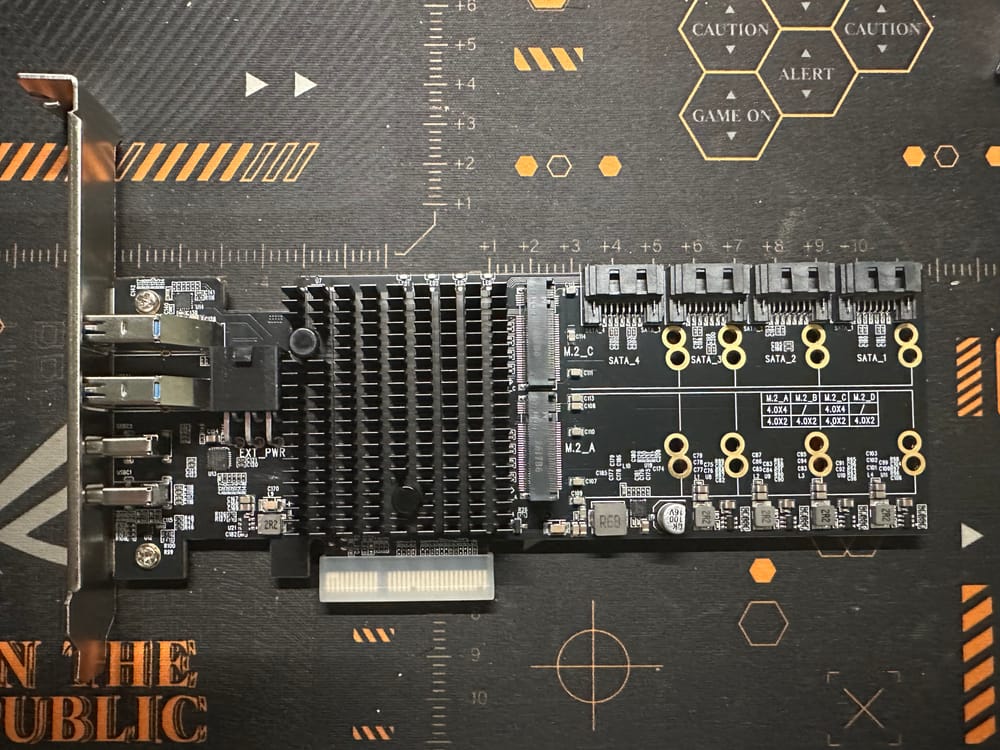
The result is a single PCIe endpoint that presents four M.2 NVMe slots, four SATA ports, two USB-C and two USB-A ports downstream, with no bifurcation support required from the host. If the slot can do x4, the card works.
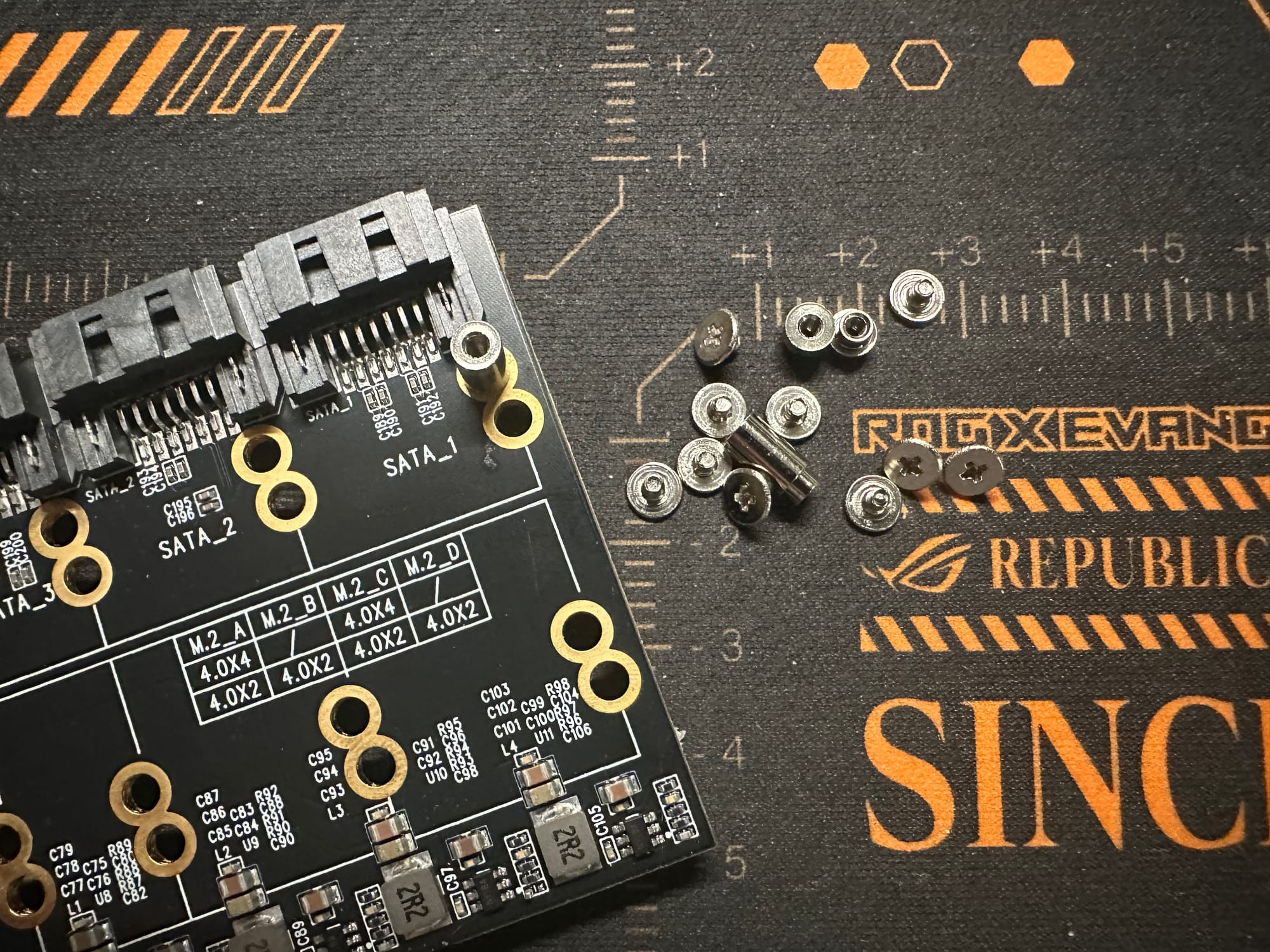
I tested it on a Minisforum BD795i SE (Ryzen 9 7945HX) running Proxmox VE 9.2, kernel 7.0.14-12-pve. That board is an unusually good match: it has exactly one x16 slot, both of its M.2 slots were already occupied, and it has zero SATA ports. The card addresses all three constraints at once, which is precisely the situation it is built for.
Everything below is measured. Raw, unfiltered data only.
What it is
- Price: $129
- Uplink: PCIe 4.0 x4, physically an x4 connector (fits any x4, x8 or x16 slot)
- Downstream: 4x M.2 NVMe (2280), 4x SATA III, 2x USB-C, 2x USB-A
- Auxiliary power: 6-pin PCIe, and it is not optional (see below)
- Bifurcation required: none
- Chipset: AMD 600 series (Promontory 21), enumerates as a PCIe switch plus an AHCI controller (
1022:43f6) and an xHCI controller
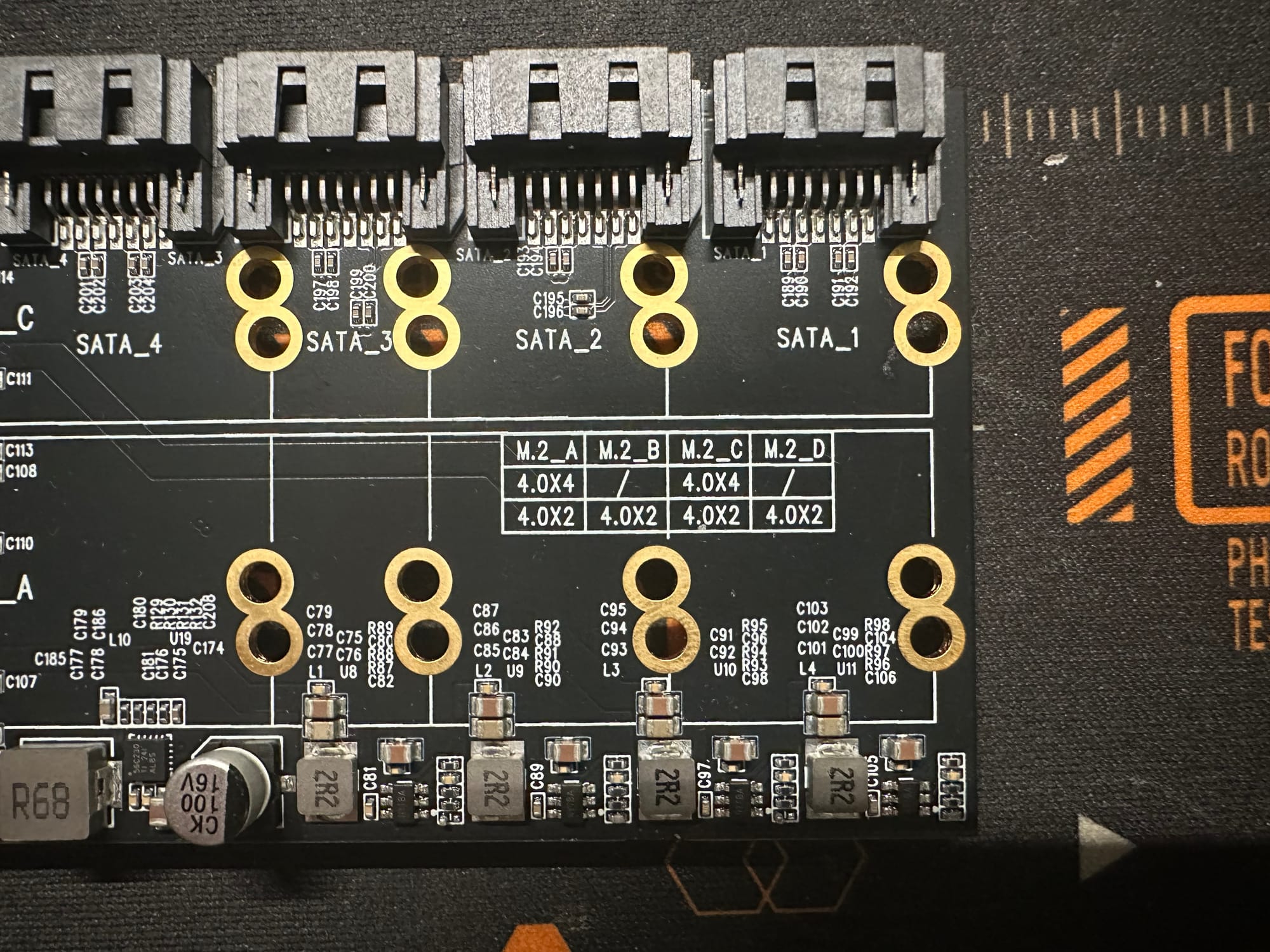
The M.2 lanes are allocated at POST based on how many slots are populated:
| Slots populated | Per-slot link | Per-slot bandwidth |
|---|---|---|
| 2 (Slot A + Slot C) | PCIe 4.0 x4 | ~7.0 GB/s |
| 4 (all) | PCIe 4.0 x2 | ~3.5 GB/s |
Both configurations consume exactly the 8 PCIe 4.0 lanes a B650 provides downstream, which is why four Gen4 x4 slots are physically impossible off this chipset. I like this choice. A lazier design would hard-wire two fast slots and two permanently slow ones. Degrading all four together avoids creating second-class bays, and Gen4 x2 at 3.5 GB/s still are plenty fast.
One note for anyone reading lspci on a partially populated card: LnkCap reflects the POST-time allocation, not fixed wiring. With two drives installed I initially read it as "two fast slots and four slow ones" and was wrong. The four PCIe 3.0 x1 ports that also appear are B650's separate Gen3 lane budget, not M.2 slots.
Install this thing with the 6-pin connected
This is the most important paragraph in the review.
I ran the first sustained write test with the auxiliary 6-pin unpopulated. The machine POSTed normally. The card enumerated perfectly. The uplink negotiated full PCIe 4.0 x4. IOMMU groups were clean. Idle power was fine. Every signal said the card was working.
Eleven minutes into a full-span write, every drive on the card disappeared at once, including one that was completely idle. The kernel logged five downstream ports failing to resume from D3hot, then both NVMe endpoints falling into an unrecoverable D3cold:
pcieport 0000:02:04.0: Unable to change power state from D3hot to D0, device inaccessible
nvme 0000:03:00.0: Unable to change power state from D3cold to D0, device inaccessible
nvme nvme1: Disabling device after reset failure: -19
A warm PCI remove and rescan does not recover this. The devices re-enumerate, BARs get assigned, and then nvme probe failed -ENODEV, because a device in D3cold needs its power rail actually dropped. It took a full power cycle.
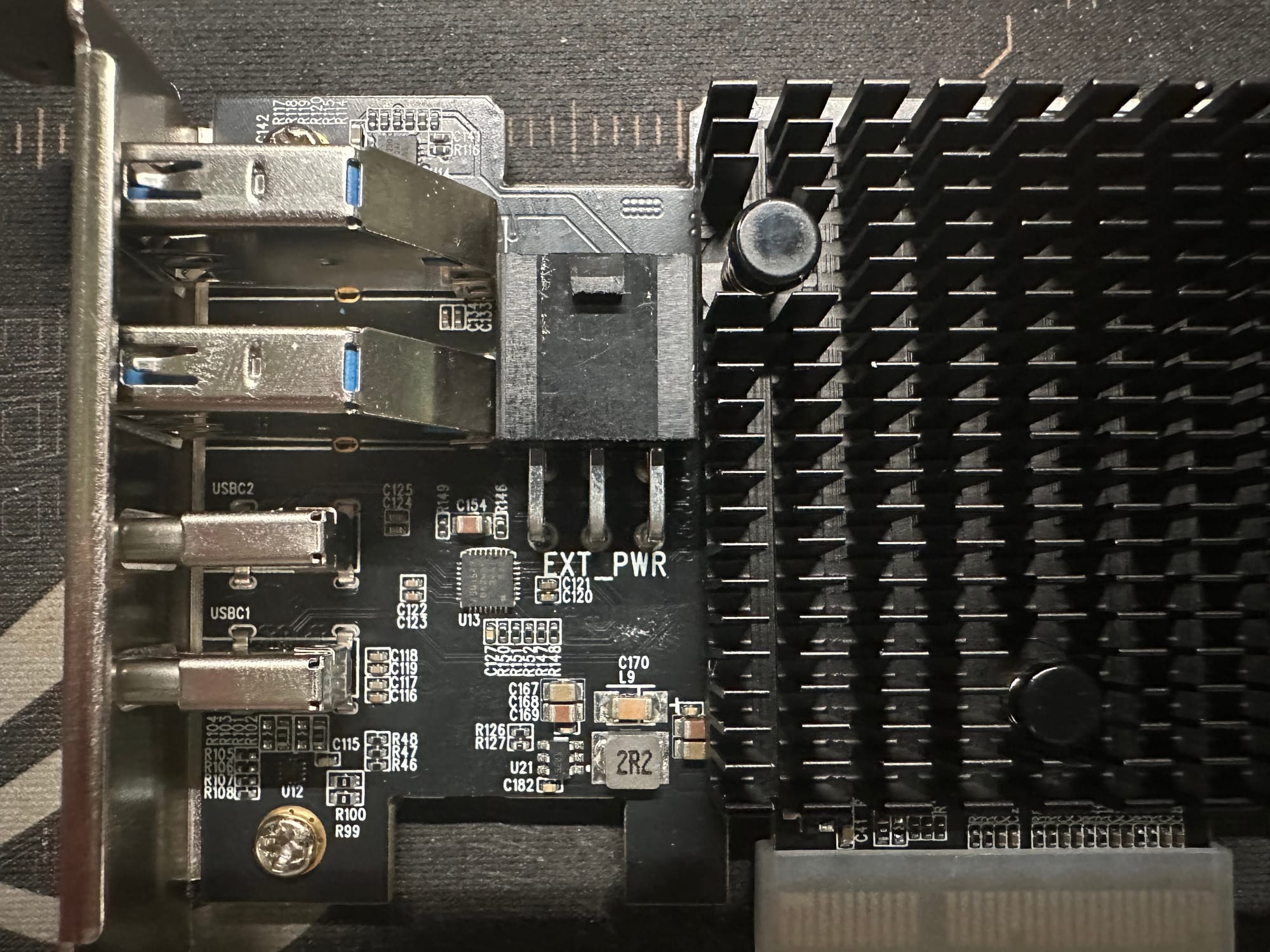
Two details made this genuinely hard to diagnose, and both are worth knowing because they point the wrong way. First, the idle devices died before the busy one. That looks like it exonerates power, but it is the opposite: a resume from D3 is exactly when a device draws a current spike, and the drive already doing work was in D0 and never had to resume. Second, every AER error counter was zero. That also looks exculpatory, and also is not: there were no link errors during traffic because the failure was a power-state transition that silently never completed.
The kernel helpfully suggests pcie_port_pm=off pcie_aspm=off nvme_core.default_ps_max_latency_us=0. Those are a red herring here. They would have masked the fault by never attempting the resume, and I would have published a confidently wrong explanation. Retesting with the connector populated and completely stock kernel settings, the identical workload completed 932 GiB in 19.2 minutes with zero unresponsive samples across 552 measurements.
My mistake, and the lesson: I assumed the connector was populated instead of verifying it. But the card deserves criticism too. It fails in the worst possible way, not at POST, not with an error, but silently, 11 minutes into real work, taking every attached drive down including idle ones. If the connector is genuinely required, the card should refuse to enumerate without it. A reviewer running a five minute benchmark suite would find nothing wrong and publish that it works.
What it actually adds
Before and after, on a board that had none of this:
| Before | After | |
|---|---|---|
| SATA controllers | 0 | 1 (AHCI, 4 of 6 ports implemented, 6 Gbps) |
| xHCI controllers | 3 | 4 |
| USB buses | 5 | 7 (including a 20 Gbps root hub) |
| IOMMU groups | 22 | 32 |
| Highest PCI bus | 05 | 0f |
| NVMe slots | 2 (both full) | 6 |
The IOMMU result deserves attention from anyone virtualizing. Every downstream device landed in its own group: each NVMe separately, the USB controller separately, the SATA controller separately. On a lot of consumer hardware everything lands in one group and passthrough becomes all or nothing. Here you can hand the entire SATA controller to a TrueNAS VM while keeping the card's NVMe on the host. That is the exact thing a Proxmox user wants and rarely gets.
Bus renumbering also worked without intervention. The BIOS gave the card buses 01-0a and pushed everything else up. Bus number exhaustion is a real failure mode for a switch behind a slot the firmware did not expect, and I had pci=assign-busses ready. It was not needed.
Idle cost is about +1.1 W at the package. That figure excludes the card and drives themselves, which draw from the slot and 6-pin where RAPL cannot see them, so treat it as the CPU-side cost of driving more active links rather than a system total.
Performance: the chipset hop costs nothing
The obvious worry with a chipset on a card is latency. Every downstream transaction takes an extra PCIe hop, and for virtualization and NAS work that matters far more than sequential bandwidth. I expected it to cost 1 to 3 microseconds.
I tested with two Seagate FireCuda 530 1 TB drives, same model and firmware, one on the card and one in the motherboard M.2 slot, then physically swapped them and re-ran everything. Two nominally identical drives are not the same silicon, and without the swap any difference is unattributable.
QD1 4K random read, which is the number that matters:
| Drive | Motherboard | On card | Change |
|---|---|---|---|
| 7VQ025T7 | 85.4 us | 82.7 us | -2.7 us |
| 7VQ0343Z | 85.8 us | 84.7 us | -1.1 us |
Both drives got faster on the card, 2 for 2. The predicted penalty would appear as a negative and it simply is not there. The honest claim is "no measurable penalty" rather than "the card is faster", because the position effect (+2.2%) is comparable to the drive-to-drive effect (+1.5%). But the penalty I went looking for does not exist.
The mid-queue results say the same thing. 4K 70/30 mixed at QD16, which is the closest thing here to a real NAS workload, came in at 107,111 IOPS on the card against 107,332 on the motherboard. That is a 0.2% difference, a dead heat.
Sequential bandwidth is also uncompromised when the drive is cool. On-card sequential reads peaked at 6,782 MB/s, against the motherboard's steady 6,537. The x4 uplink delivers full PCIe 4.0 bandwidth.
Performance: the uplink is a real ceiling, and it does not matter
Running two drives on the card simultaneously:
| Drive | Alone | Concurrent | Retained |
|---|---|---|---|
| FireCuda 530 | 5,409 MB/s | 3,128 MB/s | 58% |
| Fanxiang S880 | 4,226 MB/s | 2,532 MB/s | 60% |
| Aggregate | 9,635 MB/s | 5,660 MB/s | 58.7% |
Two drives together deliver 5,660 MB/s, only 4.6% more than one drive alone manages at 5,409. A single fast NVMe already saturates the uplink. This is the arithmetic consequence of hanging 8 downstream Gen4 lanes off a 4-lane uplink, and it is exactly what the design implies. The split is fair, 58% against 60%, so neither drive starves.
This is the criticism people will reach for, and I think it is the wrong one to lead with. 5.7 GB/s aggregate is 5.7 times a saturated 10 GbE link and roughly seven times what four SATA hard drives can produce. Contention only appears when multiple drives do sustained sequential I/O at the same time, which is a benchmark, not a workload. A NAS serving files, a hypervisor booting VMs, a media library scanning: each of those is queue-depth 1 to 8 semi-random traffic at tens to low hundreds of MB/s. Four of them together do not approach 1 GB/s.
For the record, PCIe 4.0 x1 is about 1.8 GB/s in practice, which is three times SATA III and leaves roughly 80% headroom over a saturated 10 GbE link. Even the fully-populated Gen4 x2 configuration at 3.5 GB/s per slot is far beyond what the network on the other side can consume.
While I was at it I checked whether the host's second motherboard M.2 slot shares bandwidth with the x16 slot. It does not: concurrent aggregate held 100.4% of the sum, and the combined 10,441 MB/s exceeds what any single x4 link could carry. The 7945HX has 28 lanes and the board allocates exactly 28 (x16 + x4 + x4 + x4), so nothing needs muxing.
The real limitation is thermal, and it is not subtle
This is where the card actually falls down.
| On card | Motherboard | |
|---|---|---|
| Peak temperature under write | 76.8 C | 69.8 C |
| Thermal throttle time | ~1,100 s | 151 s |
| Full-span write average | 743 to 847 MB/s | 1,870 MB/s |
The throttling follows the position, not the drive. Both FireCudas throttled around 1,100 seconds on the card and around 150 seconds on the motherboard, and the numbers swapped when the drives did. That rules out one unlucky unit.
I want to be fair about the confound, because it is a real one. The motherboard M.2 slot on this board sits directly under the CPU heatsink with a 120 mm fan over it, and the card's slots sit in still air. That is a placement difference, not proof the card's design is thermally deficient. But the magnitude is worth knowing, and so is this: at the time of the control run the CPU was at 41 C and the fan was at its roughly 665 RPM quiet floor. Minimal airflow was worth 10 C and 2.5x sustained write throughput. Whatever the card's design contributes, the problem is trivially fixable with any airflow at all.
How much you can move before any of this matters
It is worth being precise about what throttles here, because I was loose about it above. The card does not throttle. The drives do. There is no active component on the card that slows down; a FireCuda 530's controller protects itself, and it has to do that more often on the card because the card gives it no airflow. That distinction matters for who should care.
From a cold start, writing flat out at about 1,900 MB/s, the on-card drive crossed into throttling territory after roughly 70 seconds:
| Temperature reached | Time | Data written |
|---|---|---|
| 70 C | 59 to 65 s | ~112 to 124 GB |
| 73 C | 69 to 72 s | ~131 to 137 GB |
So you get somewhere around 130 GB of sustained writes at full speed before the drive starts protecting itself. For context, a FireCuda 530 1 TB carries roughly 250 GB of dynamic SLC cache, so on this card heat becomes the limit before the flash does. With airflow the order reverses: the motherboard control wrote the entire 932 GiB span at a sustained 1,850 MB/s in nine minutes, against the card's 847 MB/s over nearly twenty.
Reads are gentler, because there are no NAND program operations to generate heat. The contention testing moved roughly 336 GB of sequential reads at 5.6 GB/s and the drive only reached 72 C by the end of it.
For the workload this card is built for, those are large numbers. A NAS ingesting a camera card, a backup job, a VM migration, a media library scan: these are bursts measured in tens of gigabytes, and they finish long before the drive warms up. Sustained multi-hundred-GB sequential writes are the case that suffers, and that is a fairly specific activity.
One thing I did not measure and will not claim: what happens at a network-limited rate. Everything above is the drive running flat out. A 10 GbE link caps you at roughly 1.1 GB/s, well under the 1,900 MB/s that heats the drive this quickly, so it would generate less heat and may reach a stable equilibrium that never throttles at all. That is plausible and untested. What I can say is that the throttled write rate I measured, between roughly 470 and 850 MB/s, is *below* saturated 10 GbE, so a genuinely sustained network write could outrun a hot drive on this card. Airflow removes the question entirely.
The consequence that surprised me is about measurement, not performance. Coefficient of variation within a single 60 second test:
| Test | Position | Mean | Min | Max | CV |
|---|---|---|---|---|---|
| 1M seq read | on card | 2,632 MB/s | 700 | 6,782 | 45.6% |
| 1M seq read | on card | 3,561 MB/s | 904 | 6,224 | 64.1% |
| 1M seq read | motherboard | 6,537 MB/s | 6,454 | 6,594 | 0.3% |
On the card, throughput swings between 700 and 6,782 MB/s inside one test while the motherboard holds within 0.3%. A single-number benchmark of a drive on this card is not reproducible. Any figure you see quoted for on-card sequential throughput, including mine, reports where the test window happened to fall in the throttle cycle. I nearly published a 33% difference between two identical drives as a drive-quality finding before the variance data showed both were sitting at the same temperature and the difference was luck.
If your workload is bursty, which most are, this is a non-issue. If you write hundreds of gigabytes at a stretch, put a fan on it.
What I did not test
Being straight about the gaps, because they are real.
SATA moved zero bytes. I have drives but no data cables and no power connectors, so the four SATA ports are confirmed to enumerate (AHCI, 4 of 6 ports implemented, 6 Gbps) and nothing more. On a board with no SATA at all this is the card's best feature, and it is the biggest hole in the review. It will have to wait.
No full port concurrency. I never ran NVMe, SATA, and USB simultaneously. That is the scenario where an x4 uplink is genuinely under pressure, and it is the one most likely to find a problem. What I measured is two NVMe drives contending, which already saturates the link. Adding sustained USB-C traffic on top, which unlike NVMe really is sustained sequential when someone copies a large file off an external SSD, would be the honest stress test. Not done yet.
One sample. One card, one host, one kernel. The dropout was reproduced once and the fix verified once.
One-and-a-half platform for the benchmarks. Every performance number here is from AMD hardware on Linux. The card has since been verified working on an M1 Max Mac over Thunderbolt (see below), but that was a compatibility test, not a full benchmark, and I have not put it in an Intel board.
What Promontory 21 actually is
Worth being clear about what this chip is, because it explains both why the card works at all and where else it might.
Promontory 21 is not AMD silicon. It is designed and manufactured by ASMedia on AMD's behalf, as the 300, 400, 500 and 600 series chipsets have been (X570 is the notable exception, being a repurposed AMD I/O die, which is why it is the one that needed a fan). You can see the arrangement directly in the card's own PCI configuration space. Every device carries AMD's vendor ID 1022 and an ASMedia subsystem ID:
| Device | Vendor | Subsystem |
|---|---|---|
| PCIe Switch Upstream Port | 1022:43f4 (AMD) | 1b21:3328 (ASMedia) |
| PCIe Switch Downstream Port | 1022:43f5 (AMD) | ASMedia |
| USB 3.2 Controller | 1022:43f7 (AMD) | 1b21:1142 (ASMedia) |
| SATA Controller | 1022:43f6 (AMD) | 1b21:1062 (ASMedia) |
Architecturally the thing is a PCIe switch with peripherals attached. The upstream port and all eight downstream ports enumerate as class 0604 PCI bridges with prog-if 00, "Normal decode", which is to say bog-standard Type 1 PCI-to-PCI bridges. Bridge enumeration is defined by the PCI specification and handled by the operating system's PCI subsystem, not by a vendor driver. Nothing about it is AMD-specific.
That has an interesting implication: the bridge should work on any PCIe host, not just an AMD one. It is self-initializing over the link, needs no platform firmware cooperation beyond ordinary enumeration, and asks for no bifurcation. Nothing in what I observed suggests the switch cares what CPU is upstream of it. It certainly did not care that it was hanging off a mobile Dragon Range part in a slot AMD never intended for a chipset.
The controllers behind the bridge are a separate question, and here I want to be more careful than the obvious framing. It is tempting to say they will not work elsewhere because they need drivers. That is not quite it: they also use standard class interfaces. The SATA controller is class 0106 prog-if 01, AHCI 1.0. The USB controller is class 0c03 prog-if 30, XHCI. The NVMe drives behind it are class 0108. Those are all generic, spec-defined programming interfaces that operating systems drive with class drivers rather than vendor drivers.
So in principle the whole card is portable. In practice the limiting factor is not whether a driver exists but whether a given platform will bind one to a third-party device, and that is a policy question that varies enormously.
A Mac was the interesting case, so I tested it, and the result went against my own prediction. Details in the next section.
The enclosure to reach for is an eGPU chassis, for two reasons that have nothing to do with graphics. It supplies 6-pin and 8-pin PCIe power as a matter of course, because that is what a graphics card demands, and the auxiliary connector on this card is mandatory. And it has active cooling sized for a GPU, which is precisely the airflow the thermal testing says this card wants. A bare Thunderbolt-to-x4 adapter gives you neither.
The remaining caveat is bandwidth, and it depends on which generation you buy. Thunderbolt 3 and 4 tunnel about 32 Gbps of PCIe, roughly 2.8 GB/s usable, which is under half this card's PCIe 4.0 x4 uplink, so the 5.7 GB/s ceiling I measured would drop correspondingly. Thunderbolt 5 and USB4 version 2 raise PCIe tunneling to around 64 Gbps, which is in the region of the card's own uplink and would remove the constraint almost entirely. Those enclosures are considerably more expensive and considerably newer, which is its own kind of answer: the cheap way to attach this card externally throttles it, and the way that does not costs more than the card.
A tangent: can drives on this card talk to each other?
A reasonable question once you have four NVMe drives hanging off one switch. If drive A copies to drive C and both sit on the card, does the data have to travel up to the CPU and back down, or can the switch just turn it around?
PCIe does support this. It is called peer-to-peer, and it is native behavior rather than an extension. A switch routes transaction packets by address, so if drive A emits a write aimed at an address that belongs to drive C, the switch can forward it straight down the other port without the root complex ever seeing it. On paper this card is exactly the topology where that should pay off, since everything is behind one switch.
In practice it does not happen, and there are three independent reasons. Each one alone would be enough.
The switch is configured against it, and that is the price of good IOMMU groups
Every downstream port on the card reports this:
ACSCap: SrcValid+ TransBlk+ ReqRedir+ CmpltRedir+ UpstreamFwd+ EgressCtrl- DirectTrans+
ACSCtl: SrcValid+ TransBlk- ReqRedir+ CmpltRedir+ UpstreamFwd+ EgressCtrl- DirectTrans-
ACSCap is what the hardware can do, ACSCtl is what it is set to do. Note that DirectTrans is capable but disabled, and ReqRedir is enabled, which forces peer-to-peer requests upstream to the root complex instead of letting the switch turn them around.
Access Control Services is doing exactly what it is designed to do, and it is the same mechanism I praised earlier. Remember that every device on this card landed in its own IOMMU group, which is what lets you pass the SATA controller to one VM and keep the NVMe on the host. Linux only splits devices into separate groups when it can prove they are isolated, and ACS is that proof. If the switch were permitted to route traffic between downstream ports without the root complex seeing it, a device passed to one guest could reach a device belonging to another, and the isolation would be a fiction.
So clean passthrough isolation and free peer-to-peer are the same setting pointing in opposite directions. You can have one. This card ships configured for isolation, which for a virtualization host is the right default, and I would not want it the other way.
NVMe was never designed for drives to talk to each other
Even with the switch permitting it, drive A does not initiate anything toward drive C. NVMe is host-orchestrated: the CPU posts a command telling the drive to move data to or from a buffer at an address the host supplies. Peer-to-peer only enters the picture if the host supplies an address that lives on another device instead of in system RAM.
For that, the target device has to expose memory. In NVMe terms that is a Controller Memory Buffer, added in the NVMe 1.2 specification, or the related Persistent Memory Region. Linux has supported this since kernel 4.20 through its p2pdma framework, and the NVMe driver will register a drive's CMB as peer-to-peer memory, but only if that CMB advertises Read Data Support and Write Data Support. Without those, the drive can be neither a source nor a destination.
The drives do not have it, and this is an enterprise feature
I checked all four drives in the machine:
| Drive | NVMe version | CMBSZ | CMBLOC | PMRCAP |
|---|---|---|---|---|
| FireCuda 530 1 TB | 1.4 | 0 | 0 | 0 |
| FireCuda 530 1 TB | 1.4 | 0 | 0 | 0 |
| Fanxiang S880 2 TB | 1.4 | 0 | 0 | 0 |
| WD SN550 1 TB | 1.3 | 0 | 0 | 0 |
Zero across the board. No Controller Memory Buffer, no Persistent Memory Region. The FireCuda reports NVMe 1.4, which is four revisions past the one that introduced CMB, so leaving it out was a decision rather than a limitation of the drive's vintage.
That is normal. CMB is overwhelmingly a datacenter feature, and the drives usually named as having it are enterprise parts: Intel's Optane DC P4800X and the D3600 and D3700, alongside specialist accelerator hardware from vendors like Eideticom and Everspin. I could not find a consumer NVMe SSD that advertises it. If you are buying drives to put in this card, assume peer-to-peer is not on the menu.
Worth noting the host was not the obstacle. This Proxmox kernel ships CONFIG_PCI_P2PDMA=y, so the framework was there and waiting. The drives simply had nothing to offer it.
So what does that cost? Less than I assumed, because PCIe is full-duplex
A copy from one on-card drive to another goes drive A to system RAM to drive C, which crosses the card's x4 uplink twice. My first instinct was that this halves throughput.
That instinct was wrong, and the reason is that PCIe links are full-duplex. Transmit and receive are separate lanes. The read travels upstream and the write travels downstream, so they use opposite directions of the same link and should barely contend at all.
I measured it three ways. The source is the same on-card drive throughout; the only thing that changes is where the concurrent write goes.
| Scenario | Read retained | Aggregate retained | Aggregate |
|---|---|---|---|
| Two reads on the card, same direction | 58% | 58.7% | 5,660 MB/s |
| Card to card, opposite directions | 88% | 70.2% | 6,219 MB/s |
| Card to motherboard, separate links | 103% | 102.1% | 7,272 MB/s |
The control at the bottom is the sanity check: when the write leaves via the motherboard's own M.2 link, the two transfers are completely independent and the aggregate slightly exceeds the sum of the parts.
The interesting row is the middle one. Reading from a card drive while writing to another card drive retains 88% of standalone read throughput, against 58% when the competing traffic runs in the *same* direction. Full duplex is real and it recovers most of the penalty. What it does not do is make the second transfer free: 88% against the control's 103% means sharing the uplink bidirectionally still costs roughly 15%.
Two honest caveats. The write column in the card-to-card run retained only 39%, but that number is contaminated: the Fanxiang had already absorbed about 96 GB during its baseline measurement and was running out of SLC cache by the concurrent run. The motherboard drive, tested the same way, retained 99%. The read column is the trustworthy signal here.
And the practical answer is that none of this is the binding constraint anyway. The destination drive's write speed is. A FireCuda 530 writes at roughly 1,870 MB/s sustained, and the Fanxiang was slower still once its cache was gone. Both are far below the uplink either way. For any real drive-to-drive copy on this card, you are waiting on flash, not on PCIe.
None of it is a criticism of the card. It is a consequence of ACS doing its job, NVMe being a host-orchestrated protocol, and consumer drives not implementing an enterprise feature. But if your mental model was that a switch full of drives would shuffle data among themselves efficiently, it will not, and the reason is worth understanding before you build around the assumption.
It works on Apple Silicon, which I did not expect
I predicted above that the bridge would enumerate anywhere but that Apple Silicon's restrictive driver policy would probably leave the SATA and USB controllers unusable, with the NVMe slots having the better chance. I was wrong. All of it works.
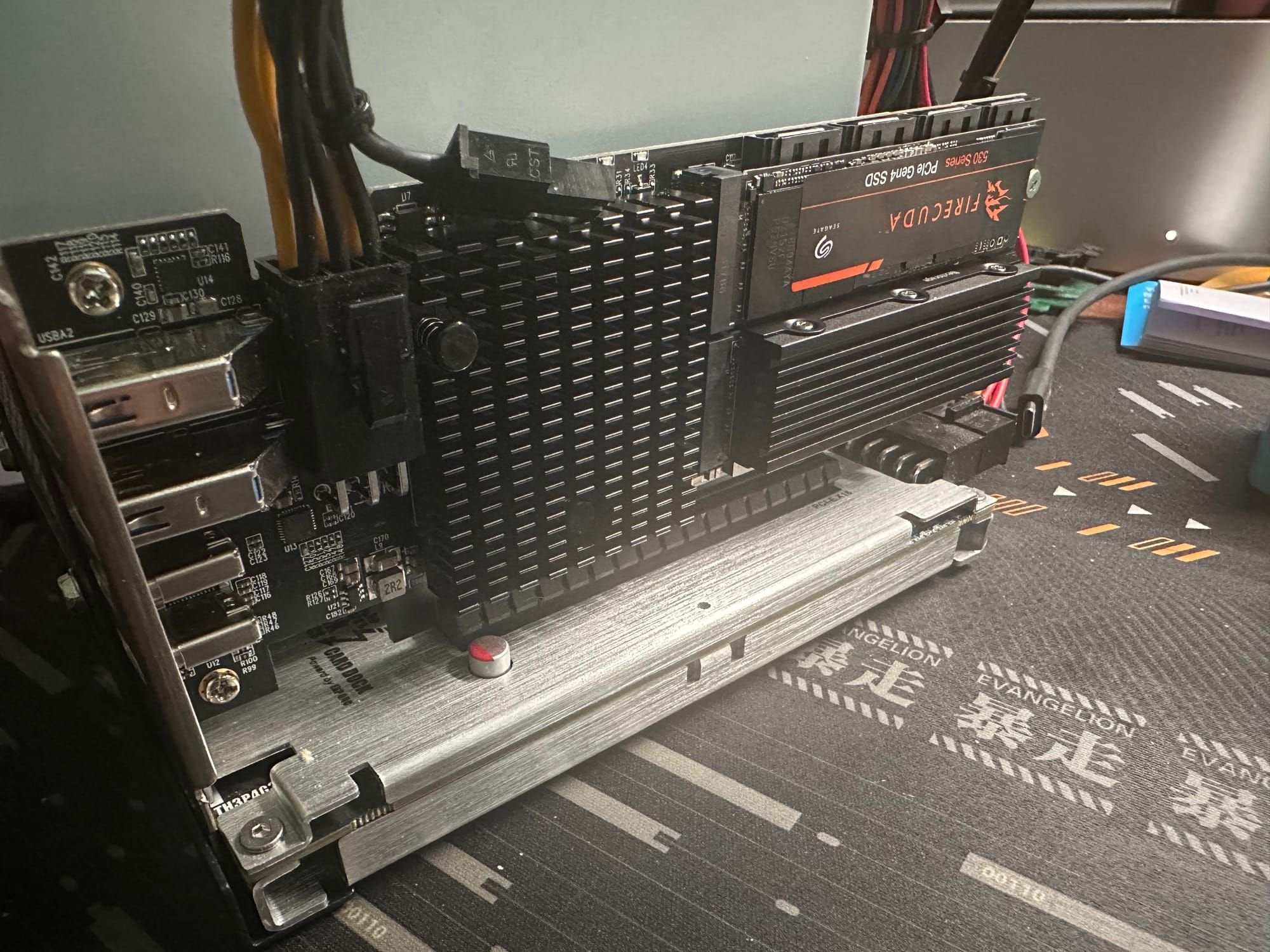
Test rig: a Mac Studio (M1 Max) running macOS 26.6.2, with the card in a Thunderbolt 3 enclosure hanging off a CalDigit TS3 Plus. All four M.2 slots populated.
| Device | Type | Driver installed | Link |
|---|---|---|---|
| Seagate FireCuda 530 1 TB | NVMe | Yes | x2 @ 16 GT/s |
| Fanxiang S880 2 TB | NVMe | Yes | x2 @ 16 GT/s |
| Nextorage NEM-PA1TB | NVMe | Yes | x2 @ 16 GT/s |
| Kingston KC3000 1 TB | NVMe | Yes | x2 @ 16 GT/s |
AMD 600 series AHCI (1022:43f6, sub 1b21:1062) | SATA controller | Yes | x1 @ 2.5 GT/s |
AMD 600 series xHCI (1022:43f7, sub 1b21:1142) | USB controller | Yes | x1 @ 2.5 GT/s |
Six devices, six drivers, on the platform I expected to be most hostile to them.
The mechanism is visible in ioreg. macOS matched the SATA controller through this:
"compatible" = <"pci1b21,1062","pci1022,43f6","pciclass,010601">pciclass,010601 is class 01, subclass 06, prog-if 01, which is AHCI. macOS bound a driver on the class code, not on a vendor ID. That is exactly the argument from the previous section, that these are generic spec-defined interfaces rather than proprietary hardware, demonstrated rather than asserted. The ASMedia subsystem IDs are visible here too, on a completely different operating system and CPU architecture.
One more corroboration worth noting: macOS reports the AHCI and USB controllers at 2.5 GT/s x1, byte for byte the same nominal link Linux reported. Two unrelated operating systems on unrelated silicon reading the same placeholder value is good evidence that it is a placeholder, and not a real 250 MB/s ceiling on those controllers.
And this confirms the four-slot bifurcation
With all four M.2 slots filled by four drives from four different vendors, every slot negotiated exactly PCIe 4.0 x2. Not one got preferential treatment, and nothing fell back to Gen3 or x1. That is precisely the behavior the vendor documents and it matches the 8-lane Gen4 budget the chipset has to divide. Earlier in this review that table came from the spec sheet and an lspci reading on a two-drive configuration. It is now measured.
Bandwidth here measures the cable, not the card
This enclosure is Thunderbolt 3, daisy-chained through a second hub, so the PCIe tunnel
is roughly 32 Gbps. Every number in this section is bounded by that, not by the card. With
that stated plainly, here is what a single drive does:
| Drive | Sequential read | Sequential write |
|---|---|---|
| FireCuda 530 | 2,868 MB/s | 2,807 MB/s |
| Fanxiang S880 | 2,879 MB/s | 1,707 MB/s |
Reads are within 0.4% of each other, which should be impossible between a Phison E18 flagship and a DRAM-less MAXIO budget drive. It happens because both are pinned against the tunnel ceiling, and when you are link-limited the drive stops mattering. The same drive managed 6,782 MB/s on the card over native PCIe, so Thunderbolt 3 is costing about 58% of what the card can deliver. That confirms by measurement what I argued earlier from the spec.
The one figure above that describes a drive rather than a cable is the Fanxiang's write, 1,707 MB/s, which sits comfortably below the ceiling.
Read variance across three cold runs, with the page cache dropped by unmounting between each, was 0.3%. Daisy-chaining cost nothing measurable.
A shared link punishes DRAM-less drives on writes, and only on writes
Running both card drives at once produced the most interesting result of the Mac testing, and it is a property of the drives rather than of this card.
Writing to both simultaneously, the aggregate pinned at the tunnel ceiling as expected. The split did not:
| Solo | Concurrent | Retained | Share of link | |
|---|---|---|---|---|
| FireCuda 530 | 2,807 MB/s | 2,007 MB/s | 71.5% | 73.6% |
| Fanxiang S880 | 1,707 MB/s | 720 MB/s | 42.2% | 26.4% |
| Aggregate | 4,514 MB/s | 2,727 MB/s | 60.4% |
By standalone speed the drives should have divided the link 62/38. They actually divided it 74/26. The FireCuda took roughly twelve points more than its capability entitles it to, and the Fanxiang was starved by the same amount.
That it was starvation rather than slowness is not an inference. The moment the FireCuda finished its transfer, the Fanxiang jumped from 720 MB/s to 1,462 and then 1,640, climbing straight back toward its solo 1,707. It had the capacity the whole time and was not being given the link.
Then the same test with reads, which is the control:
| Solo | Concurrent | Share of link | |
|---|---|---|---|
| FireCuda 530 | 2,868 MB/s | 1,343 MB/s | 49% |
| Fanxiang S880 | 2,879 MB/s | 1,415 MB/s | 51% |
| Aggregate | 5,747 MB/s | 2,758 MB/s |
Dead even, and pathologically stable: 1,343 and 1,415 MB/s repeated across fifteen consecutive one-second samples with essentially no drift.
Same drives, same tunnel, same aggregate ceiling (2,758 reading against 2,727 writing). The only variable changed is direction, and the distribution goes from 74/26 to 49/51. The transport arbitrates fairly. The asymmetry lives in the write path.
The likely mechanism is queue depth rather than bandwidth. A DRAM-less controller has to resolve flash-translation-layer updates against NAND on every write, so it acknowledges more slowly, keeps fewer commands outstanding, and therefore wins a smaller share of a contended link than its raw speed would suggest. Reads need no FTL update, both drives stream freely, and the asymmetry vanishes.
The practical consequence generalizes beyond Thunderbolt to any shared link, including this card's own x4 uplink: if you mix DRAM-less and DRAM-equipped drives behind one link, the cheap drives will do worse under concurrent write load than their standalone numbers predict. Not catastrophically, but more than you would budget for. If you are filling this card with a drawer of old drives, which is the use case I recommended it for, that is
worth knowing.
Note also that two drives reading together managed 2,758 MB/s against 2,868 for one alone. A single drive already saturates the tunnel, exactly as a single drive already saturates the card's x4 uplink.
Where this card actually belongs
On my BD795i it consumes the only x16 slot, and I am fine with that. It is a headless Proxmox node, that slot was never going to hold a GPU, and the card turns a two-drive board with no SATA into a ten-drive board. Worth noting that the slot has 16 lanes allocated and the card uses 4, so 12 lanes sit idle. On a workstation that would be a poor trade. On this machine it costs nothing real.
But thinking about it more, I suspect its ideal home is a micro-ATX board, and specifically an Intel one.
The typical mATX layout is one full-length x16 from the CPU plus a second slot running x4 from the chipset. Put a GPU in the first and this card in the second, and you lose nothing from the CPU's lanes. This is where the card being physically x4, not just electrically pays off: it drops into a real x4 slot, so it does not need the board to have a second x16-length connector, and it does not sit there wasting twelve routed lanes the way it does on my board.
Intel is the better platform for this, and the reason is DMI width. Z690, Z790, H670 and H770 connect to the CPU over DMI 4.0 x8, roughly 15.75 GB/s, twice AMD's x4 chipset link. Spending x4 of that on this card leaves x4 for everything else, which is comfortable unless the board also hangs two full-speed Gen4 M.2 drives off the chipset, in which case you are oversubscribing and should think harder. Be careful which chipset you buy, though: B660, B760 and H610 are DMI 4.0 x4, not x8, and on those the calculus is the same as AMD's.
By contrast, on an AMD B650 or X670 board the chipset link is PCIe 4.0 x4 total, so putting this card in a chipset-connected slot means an x4 chipset feeding an x4 chipset off a shared x4 link. That works, but it is a much tighter budget.
Value: $129, and what it is actually solving
The card sells for $129. Divided across what it adds, that is about $32 per NVMe slot, or roughly $16 per drive position if you count the four SATA ports, before crediting the four USB ports at all.
Compare that against the alternatives for adding NVMe slots to a board that has run out:
- A passive bifurcation riser is cheaper, but it demands that the motherboard split its x16 slot into x4/x4/x4/x4. Plenty of consumer boards will not, the option is often buried or absent in firmware, and when it is missing the card simply does not work. It also consumes a full x16 electrically to give you four slots.
- A switch-based x16 NVMe card works everywhere but carries a PLX-class switch, and those have never been cheap.
- An HBA solves SATA and does nothing for NVMe or USB.
This card needs an x4 slot and no firmware cooperation whatsoever. That is the structural advantage, and it is why the $129 is interesting rather than merely cheap.
What it will and will not do for you
This is the part I would want someone to take away, and it is a distinction the benchmark numbers make easy to miss.
It will not make your SSD pool faster. Everything I measured says so. One fast NVMe already saturates the uplink, a second buys 4.6%, and adding drives divides the same 5.7 GB/s more ways. If your goal is a faster array, this card is the wrong purchase and no amount of it will help.
It will make your SSD pool much larger, using drives you already own. That is the real problem it solves, and it is a more common problem than the speed one. A typical board has two M.2 slots. Better boards have three or four. Once they are full, adding capacity means *replacing* a drive rather than adding one, so you buy a larger SSD and the perfectly good smaller one goes in a drawer. Do that a few times across a few upgrades and you own a collection of 512 GB and 1 TB drives that cannot be used because there is nowhere to put them.
This card turns that drawer back into storage. Six NVMe slots on my two-slot board, plus four SATA ports on a board that had none, for $129 and no bifurcation support required. The drives you already bought become a pool instead of a pile.
And the bandwidth math works in exactly the case where you would do this. Four older, slower drives are individually nowhere near saturating a Gen4 x2 link, let alone Gen4 x4. The uplink ceiling that constrains four modern flagship drives is irrelevant to four cast-off 1 TB SSDs, which is precisely what people will put in it.
Verdict
I like this card considerably more than I expected to.
The engineering worry I brought to it, that a chipset hop would cost latency, turned out to be unfounded. QD1 latency is not merely acceptable, it is indistinguishable from a direct CPU-attached slot, and the mixed NAS-shaped workload came within 0.2%. The uplink delivers full PCIe 4.0 x4 bandwidth. IOMMU grouping is better than most consumer hardware. It requires no bifurcation support, which means it works on boards that would refuse a riser.
The bandwidth ceiling is real and it is also the least interesting thing about the card. Yes, four drives share four lanes. They share four lanes that are still five times faster than the 10 GbE link on the other side, and the workloads people actually run do not come close.
The two things that would stop me recommending it blind are the 6-pin, which is mandatory and fails catastrophically and silently without it, and cooling, which the card does not provide and you will have to. Note what the second one actually is, though: the card has no component that throttles. The drives do, because they are sitting in still air, and only after roughly 130 GB of flat-out writing. Bursty work never gets there. Sustained multi-hundred-gigabyte transfers do, and want a fan.
The clearest way I can put it: this card does not make storage faster, it makes storage possible. At $129 it is not competing with a faster drive, it is competing with throwing away the drives you already have because your board has nowhere left to put them.
For a Mini-ITX board with one slot and no SATA, this is the difference between two drives and ten. For an mATX Intel Z or H build with a spare chipset x4 slot, it is close to free expansion. That is a genuinely useful thing to be able to buy, and I have not seen another product that does it without asking the motherboard for permission first.
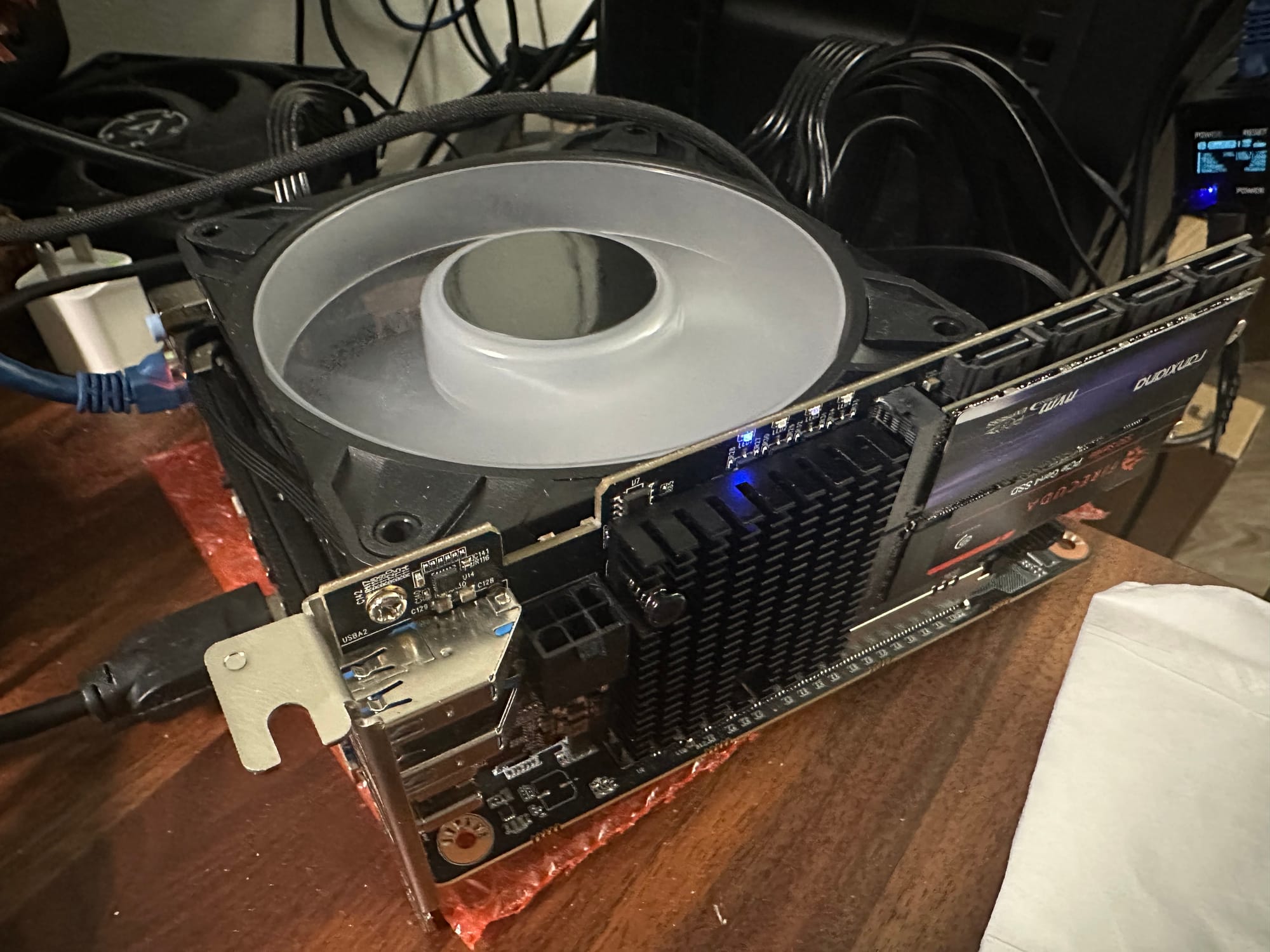
If you are interested, here's a link to buy it directly from Lekuo Shop: https://lekuo.shop/products/lekuo-southbridge-max-pcie-4-0-multi-function-expansion-card-no-motherboard-bifurcation-required
https://www.reddit.com/r/mctk/comments/1w9xmi0/eight_drives_from_four_lanes_the_lekuo/