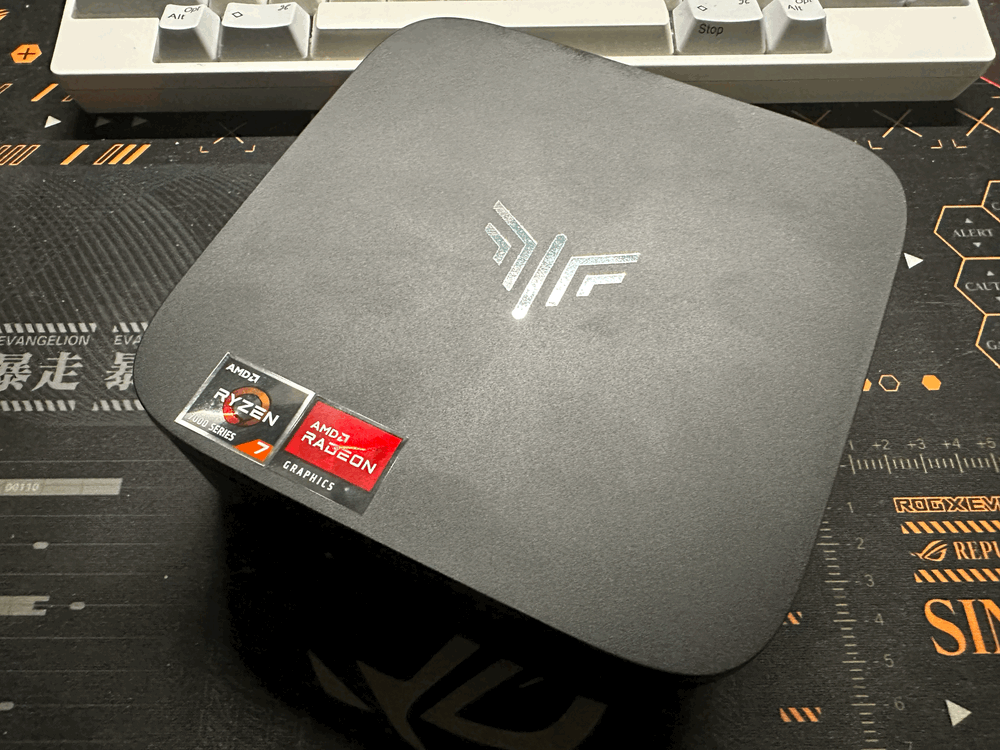
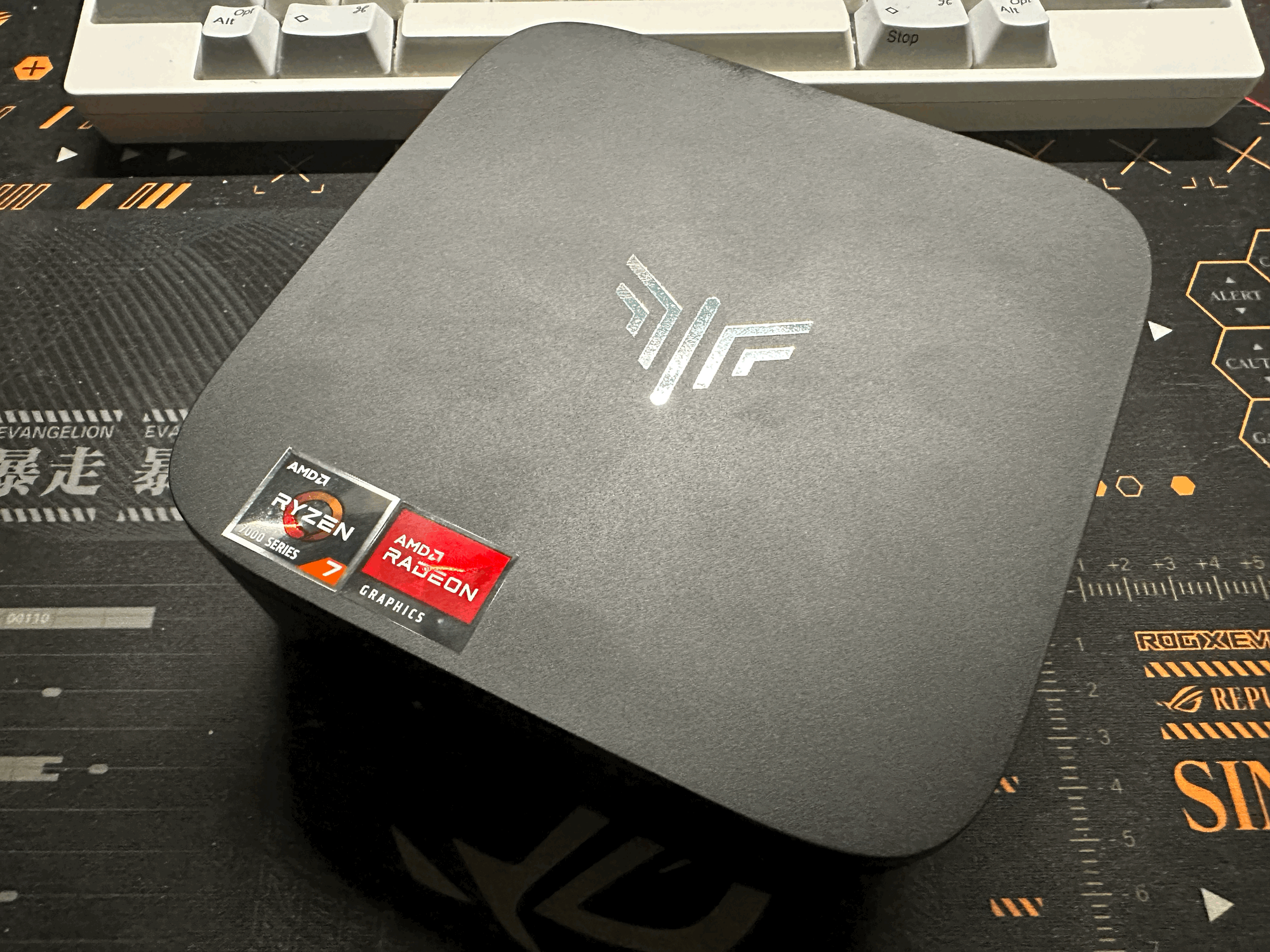
At $489.99 the Kamrui Hyper H1 walks into a crowded slice of the mini PC market with a spec sheet that looks, on paper, like a mid-range gaming tier compressed into a budget chassis. An AMD Ryzen 7 7735HS, 24 GB of LPDDR5-5500, a 1 TB NVMe SSD, a 2.5 GbE port, USB-C with DisplayPort Alt Mode, and Wi-Fi 6. The tension this review is going to work through is simple: the 7735HS can be a 54-watt chip, but Kamrui is running it at 28 watts sustained. Some things bend around that choice (single-thread performance, quite literally thermal noise), and some things do not (the Radeon 680M iGPU, which turns out to be the headline story here, even when its own memory bandwidth story is less flattering than the LPDDR5 nameplate suggests).
System Configuration
- Processor: AMD Ryzen 7 7735HS, 8 cores, 16 threads (Zen 3+, Rembrandt-R), 3.2 GHz base, 4.75 GHz boost, configured at 28W PL1 per BIOS
- Memory: 24 GB LPDDR5 running at 5500 MT/s, soldered, 4x 6 GB configuration (four 16-bit LPDDR5 channels, zero SO-DIMM slots). Note: the LPDDR5 parts are nominally rated for 6400 MT/s; Kamrui's BIOS clocks them 14% below spec.
- Graphics: AMD Radeon 680M, 12 RDNA 2 CUs, 2200 MHz peak clock
- Storage: 1 TB NVMe SSD (G932E1Q, no-name controller/NAND), PCIe Gen3 class performance
- Networking: Realtek RTL8125 2.5 GbE, Realtek RTL8852BE Wi-Fi 6 (2.4/5 GHz, not 6E)
- Power Limits: PL1 28W (per BIOS string
RMB_P3_F7_21_IEC0204_BI0005_AMI_LPD5_24G_28W_BI0005) - Power Consumption: 8.2 W idle, 55.2 W sustained load (wall measurement, ESP32 meter)
The Processor in Context
The 7735HS is AMD's second wind on Rembrandt silicon. The first wind was the Ryzen 6000 mobile series in early 2022 (Zen 3+, RDNA 2, LPDDR5 support, native USB4). That silicon got rebadged into the 7035-series "HS" parts for 2023, which is how a chip architecturally identical to the 6800H ends up in a 2025 mini PC under the 7735HS SKU. Architecturally this is Zen 3+, not Zen 4. Functionally for most buyers at this price point that distinction does not matter much: the 7735HS still gives you 8 cores and 16 threads of respectable performance, a Radeon 680M iGPU that is genuinely capable, and LPDDR5 memory that trades some throughput for meaningfully lower idle power than DDR4 platforms in this review set.
What does matter is the TDP configuration. AMD specs the 7735HS across a 35-54W range. Kamrui is running it at 28W. Every performance number on this unit should be read through that lens, because it changes what the 7735HS is. At 54W it is a laptop chip that can run sustained heavy workloads near its boost clocks. At 28W it is closer in character to a 7430U with more cores and a better iGPU.
Port Layout and Connectivity
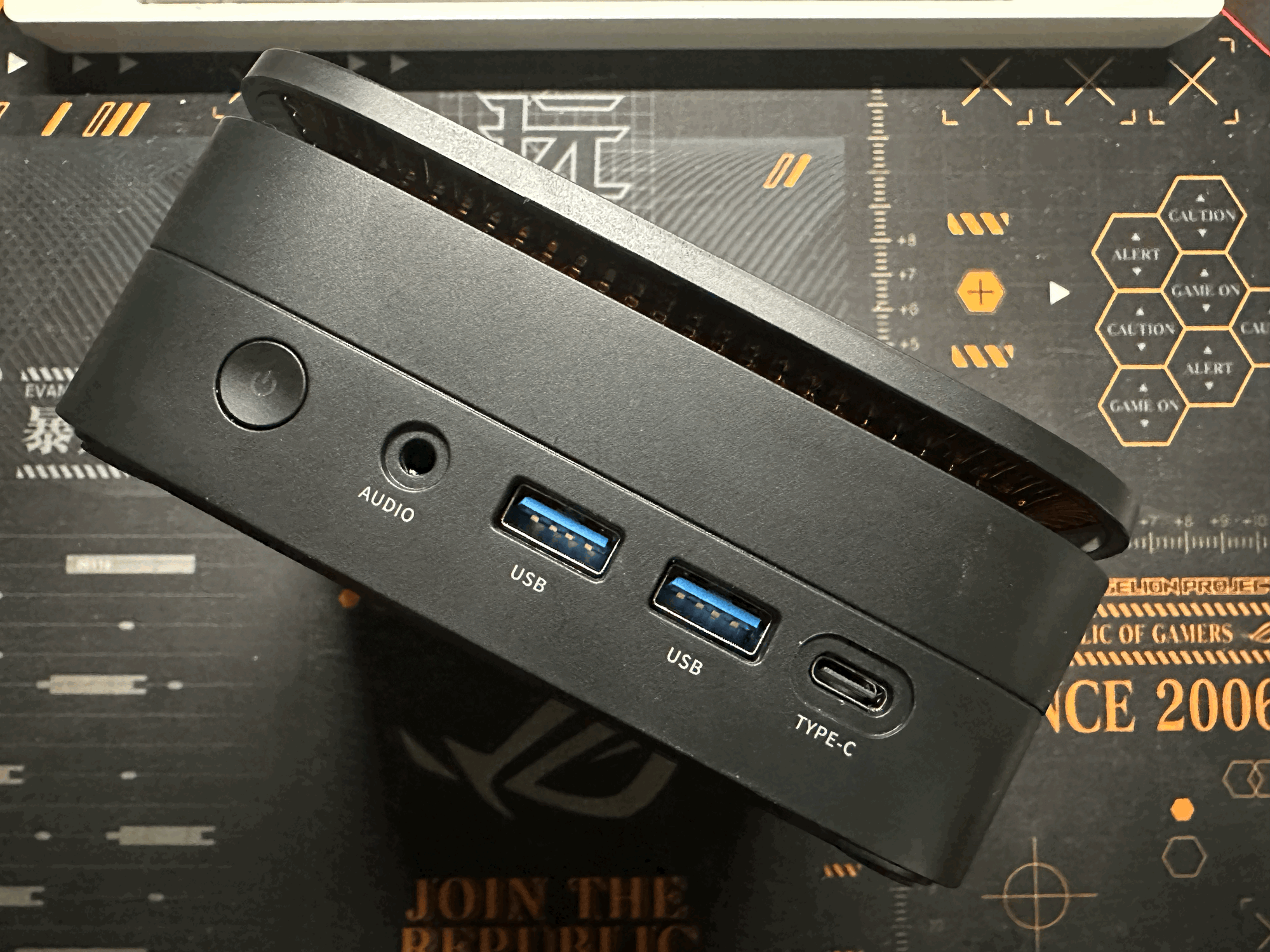
Front:
- 2x USB-A 3.2 Gen 2 (10 Gbps)
- 1x USB-C 3.2 Gen 2 (10 Gbps) with DisplayPort 1.4 Alt Mode (4K@60)
- 3.5mm combo audio jack
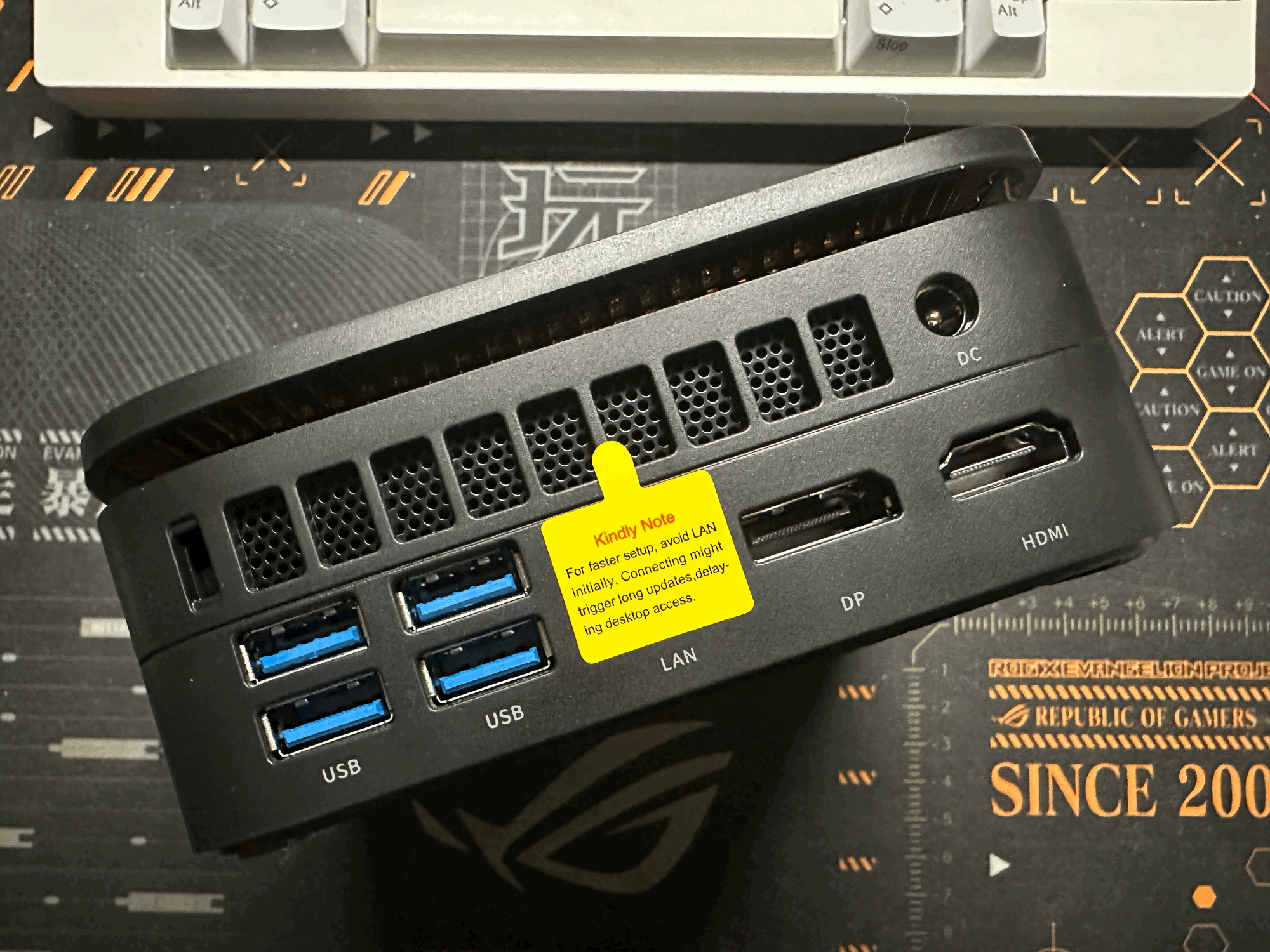
Rear:
- 4x USB-A 3.2 Gen 1 (5 Gbps)
- 1x HDMI 2.0 (4K@60)
- 1x DisplayPort 1.4 (4K@60)
- 1x 2.5 GbE RJ-45
- DC input
Six USB-A ports is generous. The mix of 10 Gbps and 5 Gbps is honest: the two 10 Gbps ports are up front where you would want them for external storage, and the four slower 5 Gbps ports are rear-mounted for permanent peripherals. The USB-C port doing DP Alt Mode means this unit can drive three 4K@60 displays simultaneously (HDMI + DP + USB-C), which is the kind of spec you would otherwise pay a premium tier for.
A sidebar on USB4
It is worth addressing this because Device Manager will mislead anyone who spends ten seconds looking at it. The 7735HS is an AMD Rembrandt-family chip, and Rembrandt's SoC includes internal USB4 host router silicon regardless of whether the board manufacturer wires that silicon out to a physical port. On the Hyper H1, Windows enumerates two "USB4 Host Router (Microsoft)" devices in Device Manager. Those are the SoC routers, not USB4 ports. Kamrui's own spec sheet is honest about this: the front USB-C is USB 3.2 Gen 2 (10 Gbps), not USB4. The practical test is to plug a fast NVMe enclosure into the front USB-C and run a transfer benchmark. A real USB4 port will sustain 3000+ MB/s; a Gen 2 port caps near 1000 MB/s. This distinction is why many review sites get USB4 claims wrong on cheap AMD mini PCs, and it is worth understanding before reading marketing copy elsewhere.
The notable omission is Wi-Fi 6E or Wi-Fi 7. The RTL8852BE is a dual-band Wi-Fi 6 part, 2.4 and 5 GHz only, no 6 GHz band. In 2026 that reads as cost-saving rather than genuinely limiting for most home networks, but if you have a Wi-Fi 7 router and care about the 6 GHz band, the card is an M.2 module you can swap if you are willing to open the chassis.
Expandability and Internal Storage Options
The RAM is soldered LPDDR5. There are no SO-DIMM slots. 24 GB is what you have, forever. This is the single most important architectural trade-off in this system: soldering is part of what enables LPDDR5 (shorter traces, tighter impedance control), which in turn delivers the lower idle power this unit trades on, but it is also why you cannot go to 32 or 64 GB down the road. For most buyers at $490, 24 GB will feel generous for a long time. For anyone who would plan to run a lot of VMs or large language models locally, this is the ceiling and it is hard.
The 1 TB NVMe is in an M.2 2280 slot and can be replaced. The SSD as shipped (G932E1Q) is a no-name SKU with no publicly available TBW endurance rating, so I would treat it as a commodity drive: fine for normal use, swap it if you plan to push heavy sustained writes. It does come with an additional M.2 slot that supports PCIe NVMe SSD, which is very much welcomed.
Performance Analysis
CPU Performance
Headline numbers:
| Benchmark | Hyper H1 (7735HS) | Kron K1 (7430U) | Hyper H2 (11900H) | AceMagic M1 (13900HK) | Kamrui Hyper (14450HX) |
|---|---|---|---|---|---|
| GB6 Single | 1966 | 1953 | 2225 | 2645 | 2575 |
| GB6 Multi | 8755 | 6469 | 8408 | 9030 | 11043 |
| y-cruncher Pi-1B (s) | 58.8 | n/a | n/a | n/a | n/a |
| 7-Zip Compress (MIPS) | 5843 | n/a | n/a | n/a | n/a |
| 7-Zip Decompress (MIPS) | 9293 | n/a | n/a | n/a | n/a |
| Blender Classroom CPU (spm) | 37.3 | n/a | n/a | n/a | n/a |
The single-core result is the review's most uncomfortable number. 1966 from a Zen 3+ chip with a 4.75 GHz boost clock is not what the 7735HS looks like at its intended 45-54W configuration, where 2100-2300 is the normal range. It is what the 7735HS looks like at 28W, where the chip runs out of peak power budget before short ST bursts can hold peak clocks. The 7430U, a 15-28W Zen 3 part, lands at 1953: essentially a tie. If you were expecting a 7735HS to feel snappier than a 7430U for web browsing, IDE interaction, or Office work, on this specific Kamrui configuration it will not. The cores are there; the ceiling on each one is not.
The multi-core story is the opposite. 8755 in Geekbench 6 places the Hyper H1 ahead of the i9-11900H (8408) and within 3% of the i9-13900HK (9030). It trails the i5-14450HX (11043) by 21%, but the 14450HX is a 24-thread hybrid with twice the cooling headroom and sits at the top of the review set. At 28 watts, 8 wide Zen 3+ cores put up a genuinely strong sustained MT number because the TDP still allows all 16 threads to run just below their sustained-all-core clock. This is where Kamrui's TDP choice actually works: it trades the peak clock nobody sustains for long anyway, and keeps the broad sustained throughput intact.
y-cruncher Pi-1B in 58.8 seconds with 96.8% multi-core efficiency confirms this reading. The 7-Zip decompression number of 9293 MIPS is the compression benchmark where Zen's branch-prediction strengths play well. Blender Classroom CPU at 37.3 samples/min is acceptable for an 8-core chip at 28W, but the more interesting Blender story happens on the GPU.
Graphics Performance
This is where the Hyper H1 earns its price:
| Benchmark | Hyper H1 (680M) | Kron K1 (Vega 7) | Hyper H2 (UHD Xe) | AceMagic M1 (Iris Xe 96EU) | Kamrui Hyper (UHD 16CU) |
|---|---|---|---|---|---|
| GB6 OpenCL | 26009 | 8468 | 7334 | 14730 | 4027 |
| Heaven Basic FPS | 100.5 | 37.3-62.4 | 47.2 | 68 | 26.8 |
| Heaven Basic Score | 2533 | n/a | n/a | n/a | n/a |
| Blender Classroom GPU HIP (spm) | 59.5 | n/a | n/a | n/a | n/a |
Geekbench 6 OpenCL at 26009 is not close to any prior system in this review set. It is roughly 1.8x the score of the i9-13900HK's Iris Xe, the best Intel iGPU I have previously tested, and 6.4x the i5-14450HX's UHD Graphics (which was a low-end Raptor Lake 16-EU chip deliberately trimmed for cost). The Radeon 680M is 12 RDNA 2 compute units clocked at 2.2 GHz, and that is architecturally closer to an entry-level discrete GPU than to an Intel iGPU in the same era. The 680M's win over Iris Xe is shader throughput and texture fill rate, not a memory bandwidth advantage: the 13900HK has 2x16 GB DDR4-3200 dual-channel at ~40 GB/s, actually more bandwidth than this Kamrui's LPDDR5-5500 at 35.7 GB/s.
A roofline read on where the 680M really sits
The more honest framing of this iGPU is to compare it not to the DDR4-based Intel iGPUs in this review set, but to a properly outfitted RDNA 3 iGPU (the Radeon 780M) on DDR5-5600 dual-channel. I ran a Vulkan compute roofline sweep on a 7840HS / 780M dev box in a prior project. That work produced a clean bandwidth-vs-compute picture of what a 12 CU AMD iGPU can actually do when memory is not artificially constrained. Placing the 680M on the same map:
| Property | 780M on DDR5-5600 | 680M on LPDDR5-5500 (this unit) |
|---|---|---|
| Architecture | RDNA 3, 12 CU | RDNA 2, 12 CU |
| Peak GPU clock | ~2600 MHz (54W) | ~2200 MHz |
| Theoretical FP32 peak (scalar) | ~4700 GFLOPS | ~3380 GFLOPS |
| Memory bus | 128-bit DDR5 | 64-bit LPDDR5 |
| Measured bandwidth (peak) | 73 GB/s | 35.7 GB/s |
| Effective roofline peak (AI≥ridge) | ~1180 GFLOPS | ~845 GFLOPS (est., same ratio) |
| Roofline ridge point | AI ≈ 16 F/B | AI ≈ 23 F/B |
The ridge point is the arithmetic intensity at which a workload transitions from bandwidth-bound to compute-bound. The 680M here has a higher ridge point than the 780M despite having less peak compute, because bandwidth is roughly half. Most game rendering workloads sit at AI 1-4 F/B, which is deep in the bandwidth-bound regime for both iGPUs. In that regime, performance is roughly proportional to memory bandwidth, and this Kamrui's 49% bandwidth ratio against the 780M system predicts roughly half the gaming throughput of a properly provisioned 780M box at the same rendering target. Heaven at 100.5 FPS here is good against Intel iGPUs but would look modest against a 780M box running the same preset, and that is the framing readers should carry away.
Kamrui's choice to run the LPDDR5 at 5500 MT/s instead of the parts' rated 6400 MT/s is costing roughly 15-20% of the 680M's potential in bandwidth-bound workloads. If a future BIOS unlocks 6400 MT/s, measured bandwidth would climb from ~36 to ~40 GB/s, ridge point would drop from 23 to around 20 F/B, and everything bandwidth-bound would gain a proportional amount. This is the single most impactful firmware-level change Kamrui could make to this unit.
Heaven Benchmark at the Basic preset averages 100.5 FPS with a 2533 score. Compare to 68 FPS on the 13900HK, 47.2 on the 11900H, 37.3 on the 7430U in single-channel and 62.4 in dual-channel. At $490 for the full system, the Hyper H1 delivers an iGPU experience that walks past every more expensive mini PC previously reviewed here. Heaven is a 2013 benchmark and does not predict modern game engine behavior, but it does give a clean comparative read on peak iGPU throughput in a standardized rasterization workload, and 680M clears the field.
Blender 4.x Classroom rendered on the HIP device (Radeon 680M) completes at 59.5 samples/min, about 60% faster than the CPU at 37.3 spm. This is the first mini PC in the review set where rendering on the iGPU is meaningfully faster than the CPU, which matters if you do any occasional 3D rendering, Blender work, or GPU-accelerated video encoding. Intel's Arc/Xe iGPUs are nominally capable of the same class of work via SYCL or OpenCL, but in practice the software ecosystem around AMD HIP on RDNA 2 is substantially more mature for Blender specifically.
None of this makes the 680M a gaming GPU in any modern sense. Cyberpunk at 1080p medium is a slideshow on any iGPU including this one. But for the casual gaming strata (indie titles, older AAA at 720p low, emulation up through PS2 and most GameCube/Wii), the 680M genuinely delivers.
Memory Performance
The memory subsystem on this unit is the one spec where Kamrui's cost-cutting stands out as a meaningful performance ceiling, and this section has to explain why.
The 24 GB is wired as 4x 6 GB across four independent 16-bit LPDDR5 channels, giving a 64-bit effective memory bus. The LPDDR5 parts themselves are rated to 6400 MT/s. Kamrui's BIOS clocks them at 5500 MT/s, 14% below rated spec. At 5500 MT/s across a 64-bit bus, the theoretical peak is 5500 × 64 / 8 = 44 GB/s, and MLC measured 35.7 GB/s (81% of theoretical, which is normal LPDDR5 efficiency). At the chips' rated 6400 MT/s the theoretical ceiling would have been 51.2 GB/s and real-world would land near 40 GB/s. So before comparing to anything else, understand that this unit is giving up 15-20% of its platform's potential bandwidth because of a conservative BIOS choice.
Context matters here, so compare to three reference points:
| System | Memory | Theoretical BW | Measured BW |
|---|---|---|---|
| Kamrui Hyper H1 (this unit) | LPDDR5-5500, 64-bit | 44 GB/s | 35.7 GB/s (MLC) |
| Dual-channel DDR4-3200 mini PC | DDR4-3200, 128-bit | 51.2 GB/s | ~40 GB/s typical |
| Ryzen 7 7840HS dev box (Phoenix, 780M) | DDR5-5600, 128-bit | 89.6 GB/s | 73 GB/s (clpeak)* |
*From the 780M roofline analysis.
Against dual-channel DDR4-3200, the Hyper H1 is bandwidth-inferior, not parity. DDR4-3200 mini PCs with proper 2x16 GB kits (the i9-13900HK AceMagic M1, the i5-14450HX Kamrui Hyper, the i9-11900H Kamrui Hyper H2) have both more theoretical and more measured bandwidth than this Hyper H1 does. The LPDDR5 nameplate is the kind of spec bullet that sounds modern but delivers less throughput than a five-year-old DDR4 platform in the same class.
Against a properly outfitted DDR5-5600 dual-channel system running the same generation Radeon iGPU (my 780M Phoenix dev box, 12 CU RDNA 3), this unit has 49% of the memory bandwidth (35.7 / 73). This is the more important comparison for understanding iGPU performance, and the Graphics Performance section builds on it below.
Where LPDDR5 still carries real advantages at 5500 MT/s:
- Idle power. LPDDR5 at ~1.05 V with aggressive self-refresh is part of why this unit idles at 8.2 W vs 14-20 W for DDR4 mini PCs. That advantage is independent of the 5500 vs 6400 question.
- Access parallelism. Four independent 16-bit channels can service concurrent CPU + iGPU traffic with less contention than two 64-bit channels. Random-access workloads benefit more from this than peak-streaming workloads.
- Future scaling. LPDDR5X-7500 and LPDDR5X-8533 are real specs that future Rembrandt/Phoenix/Hawk Point successors will use. DDR4 is dead-ended.
Where LPDDR5 loses even at its rated speed is latency. 124 ns in MLC here is meaningfully worse than a good DDR4 platform's 80-95 ns. Memory-latency-sensitive workloads (compilation, pointer-chasing code, certain database queries) will give up some performance compared to a DDR4-3200 system. This compounds the single-thread story: the 28 W PL1 caps peak boost, and LPDDR5 latency stretches cycles spent waiting on memory. STREAM Triad at 25 GB/s is the figure an iGPU or a memory-bound CPU workload will actually see, and it is a fine number but not an exceptional one.
Storage Performance
| Benchmark | Hyper H1 (G932E1Q) |
|---|---|
| diskspd SEQ Read | 3365 MB/s |
| diskspd SEQ Write | 2254 MB/s |
| diskspd RND 4K Q32 Read | 362.8 MB/s (92,881 IOPS) |
| diskspd RND 4K Q32 Write | 264.8 MB/s (67,785 IOPS) |
| diskspd RND 4K Q1 Read | 68.2 MB/s (17,457 IOPS) |
| diskspd RND 4K Q1 Write | 122.5 MB/s (31,366 IOPS) |
Numbers measured via Microsoft diskspd, not CrystalDiskMark, so interpret them as "the highest-queue-depth sustained rate a well-tuned benchmark can extract" rather than the CDM numbers typically quoted in reviews. The drive is a PCIe Gen3 class NVMe, competent but not exceptional. Sequential read at 3365 MB/s lands near the practical top of Gen3. The Q1 random read of 68.2 MB/s / 17,457 IOPS is in the middle of the pack for modern NVMe and will not bottleneck anything that is not a database or VM workload. The controller and NAND configuration are unknown; the G932E1Q is not a publicly documented SSD SKU and its TBW rating is not advertised. I would treat it as commodity storage: fine for OS and applications, and easy to swap if your use case demands something better-known.
Network Performance
2.5 GbE on the wire via the Realtek RTL8125 is the review-standard expectation by 2026, and the Hyper H1 has it. On Wi-Fi 6, the RTL8852BE negotiated a 1201 Mbps link speed and iperf3 measured 625 Mbps real-world throughput to the LAN iperf3 server. That is solid Wi-Fi 6 performance, not limited by the mini PC. The missing piece is the 6 GHz band: this card is a Wi-Fi 6 part, not Wi-Fi 6E, so if your router has 6 GHz spectrum advertised, this unit cannot use it. The card is M.2 2230 and upgradable to a Wi-Fi 7 module down the road if that matters.
Power Consumption
Idle at the wall measured 8.2 W. This places the Hyper H1 second-best in the review set, behind only the 7430U's 6 W and ahead of the i9-13900HK's 14.2 W, the i5-14450HX's 20 W, and the i9-11900H's 20 W. For a system running 24/7 as a home server at $0.15/kWh, that is roughly $10.78/year in electricity at idle: not zero, but low enough to be a rounding error in the household power bill.
Sustained load from the wall hit 55.2 W during y-cruncher and Blender CPU runs. The CPU package itself peaked at 35.2 W (capped hard by the 28W PL1 plus brief boost headroom), while the iGPU peaked at 48 W during Blender GPU rendering. Peak Tctl was 85.3 °C under diskspd and 78.5 °C under y-cruncher, both well within Ryzen's thermal ceiling.
Idle-to-load ratio is the cleanest efficiency story in the review set. The 13900HK's 14.2 W idle is the closest comparison, and this unit beats it by 6 W at idle while also carrying a substantially more capable iGPU. LPDDR5 and the 28W configuration both help here.
Noise
Kamrui's cooling design is quiet at idle and stays quiet even at sustained load. This is the direct consequence of the 28W PL1: with only 28 watts to dissipate sustained, the fan never has to spin up past a gentle baseline. On an air-conditioned desk next to a monitor, the unit is effectively inaudible at idle and shows a quiet, stable baseline hum under y-cruncher and Blender workloads. There is no pitch change, no throttling cycle, no fan-ramp whine. If you have been frustrated by noisy Intel mini PCs (the 14450HX and the 11900H both audibly spin up during sustained load), this is a genuine quality-of-life upgrade.
Use Case Recommendations
Productivity Workstation. Good, with one caveat. The multi-core throughput is genuinely strong for the price, and 24 GB of RAM is generous for spreadsheets, browser-heavy workflows, and office applications. The caveat is ST-bound interactive responsiveness: the 28W TDP cap means individual tab loads, application cold-starts, and IDE autocomplete latency will feel closer to a 7430U than to the 7735HS's published spec. Most users will not notice; some will.
Development Environment. Strong. 8 cores, 16 threads, 24 GB RAM, 1 TB NVMe. For a local Node/Python/Go/Rust dev box this is more than enough, and the iGPU is sufficient for any reasonable browser-plus-IDE workflow. The soldered RAM ceiling is worth thinking about if you plan to run multiple heavy VMs.
Home Server. Excellent. 8.2 W idle means it costs pennies a month to leave on. 2.5 GbE means NAS throughput will not bottleneck on the wire. 1 TB of storage plus (presumably) room for a second M.2 gives enough headroom for media, backups, and containers. Quiet enough to live in a closet or next to a TV. The iGPU's video decode capability handles Plex transcoding for H.264 and H.265 HDR without breaking a sweat. This is probably where the Hyper H1 is most comfortable.
Light Content Creation. Surprisingly capable. The 680M + LPDDR5 combination is the first system in this review set where Blender rendering on the iGPU is actually faster than on the CPU. For occasional 3D work, simple video editing (DaVinci Resolve at 1080p with the GPU accelerator), or photo editing, it holds up. Do not expect 4K video editing performance.
Gaming. The best iGPU gaming experience in this review set by a wide margin, and still an iGPU. Modern AAA at 1080p medium is not a realistic target. 720p low on modern titles, 1080p medium on older titles, and indie games / emulation all work well.
Value Proposition
Bill of Materials
At $489.99, the Hyper H1's component budget has to cover: a Ryzen 7 7735HS (OEM tray pricing roughly $180-220 in volume), 24 GB of LPDDR5 (roughly $50-70), a 1 TB NVMe SSD (roughly $50 at commodity no-name pricing), a 2.5 GbE controller and PHY (roughly $5), a Wi-Fi 6 M.2 module (roughly $8), a chassis plus cooler plus PSU brick (roughly $40-50), and the motherboard itself. At $490 the margin is thin. Kamrui is almost certainly making money on volume, not on margin per unit.
Upgradeable vs Permanent
- Soldered (permanent): RAM (24 GB LPDDR5 forever), Wi-Fi (M.2 2230, replaceable but requires opening), Ethernet NIC (2.5 GbE Realtek soldered), CPU, iGPU
- Upgradeable: NVMe SSD (single M.2 2280 slot)
The soldered RAM is the most important permanent constraint: 24 GB is where this system lives forever. The Realtek RTL8125 2.5 GbE is a standard choice and one of the cheaper 2.5 GbE parts, but also genuinely good; no criticism there. The Realtek Wi-Fi 6 part is where I would criticize the cost-saving most: Intel AX211 or a Wi-Fi 6E/7 module would be a $5-10 difference at BOM and would have been worth the upgrade.
Competitive Comparisons
- vs AceMagic Kron K1 (7430U, $340): Pay $150 more for 8 cores instead of 6, an iGPU roughly 3x as fast (26009 vs 8468 GB6 OpenCL), LPDDR5 instead of single-channel DDR4, 2.5 GbE instead of gigabit, and 24 GB instead of 16 GB. Single-thread is a tie. At 44% more money you get substantially more system, and the Kron K1's value math only wins if you actually never need more than 6 cores and do not care about the iGPU.
- vs Kamrui Hyper (i5-14450HX, ~$500): Essentially the same price. 14450HX wins on raw MT (11043 vs 8755, +26%) and on single-thread (2575 vs 1966, +31%). Hyper H1 wins crushingly on graphics (26009 vs 4027 in GB6 OpenCL, 6.4x) and on idle power (8.2 W vs 20 W). If your use case is CPU-heavy workloads on an AC-powered desktop where noise and electricity do not matter, the 14450HX is a better pick. If it is a 24/7 system, a media box, or anything where iGPU matters at all, the H1 wins.
- vs AceMagic M1 (i9-13900HK, ~$749): Pay 35% less ($260 off) for 3% worse MT (8755 vs 9030), 26% worse ST (1966 vs 2645), but 77% better iGPU (26009 vs 14730) and 42% lower idle power (8.2 W vs 14.2 W). The 13900HK justifies its premium on ST responsiveness and raw CPU peak; the H1 justifies its price on everything else.
- vs Mac Mini M4 ($499): This is the elephant. The M4 is faster in ST (roughly 3400 in GB6, 73% faster than this Kamrui), faster in MT (roughly 15000, 71% faster), and its GPU via Metal is roughly comparable or better than the 680M for well-optimized workloads. It idles at 2-3 W and is similarly quiet. It also ships with 16 GB RAM and 256 GB storage at base price, where the Kamrui gives you 24 GB and 1 TB. If you run macOS, the M4 is straightforwardly the better machine at the same price. If you run Windows or Linux and care about expansion (the NVMe slot the Mac Mini does not have), more base RAM, or more base storage, the Hyper H1 makes its case.
Software Experience
Windows 11 Out-of-Box Experience
Windows 11 Pro 25H2 was preinstalled. The OOBE took an acceptable amount of time for a modern Windows setup and did not exhibit the multi-hour "installing updates" pathology that the i5-14450HX's first-boot experience did. The "Default string" DMI manufacturer and model fields are cosmetically annoying (Windows reports the system model as "Default string" in About) but have no functional impact.
Linux Compatibility (not tested)
I did not boot Linux on this unit for the review window. All of the component choices (AMD Rembrandt, Realtek RTL8125, Realtek RTL8852BE) are well-supported on current mainline kernels, so I would expect a recent Fedora or CachyOS to come up cleanly. LPDDR5 memory reporting is sometimes quirky under Linux for AMD mobile parts; expect dmidecode to show correct values and free -h to show the right totals, but individual-module reporting may be thin.
Conclusion
The Kamrui Hyper H1 is a good mini PC at $490, and the review is really a story about what a vendor gets when they pick a 28-watt configuration of a 54-watt-capable chip. They lose some single-thread peak, because the chip never gets to sit at its advertised boost. They keep most of the multi-thread performance, because the all-core sustained clock at 28 W is not much below what it is at 45 W. They get most of the iGPU, because the iGPU has its own power budget and the 680M with LPDDR5-5500 behind it is architecturally a very good iGPU regardless of CPU TDP. And they get a quiet, cool, low-idle-power machine, because the cooling only has to move 28 W of heat.
The iGPU story is the standout result within this review set. GB6 OpenCL at 26009 and Heaven at 100.5 FPS make this system a different class of iGPU than any prior Intel-iGPU mini PC I have reviewed, and the win is architectural: 12 RDNA 2 CUs at 2.2 GHz out-shade Iris Xe, at memory bandwidth slightly below dual-channel DDR4-3200. The caveat is that this iGPU is bandwidth-starved relative to the same-generation Radeon 780M on a proper DDR5-5600 dual-channel system, and the Kamrui's 5500 MT/s BIOS choice makes that gap worse than the silicon requires. Against the DDR4-based Intel iGPU competition at this price point, the 680M wins decisively; against a properly provisioned DDR5 dual-channel system with a 780M, it would land at roughly half the bandwidth-bound performance.
The soft spots are soldered RAM at 24 GB running 14% under its rated speed, a Wi-Fi 6 card where Wi-Fi 6E would have cost a few dollars more, and a mystery-SKU NVMe where a known-brand drive would have cost maybe $10 more. None of them are disqualifying. The soldered RAM is the one that merits the most thought before purchase: if you see a scenario where you would want 32 or 64 GB later, this is not your machine. The 5500 MT/s firmware choice is a legitimate grievance that a BIOS update could address; I would watch for one.
Final recommendation: buy the Hyper H1 if you want a quiet, efficient home server or media box, a light-to-medium content creation workstation, a browsing and productivity desktop where the iGPU headroom matters, or a cheap second-system for emulation and older gaming. Buy the Kamrui Hyper 14450HX at the same price if your workload is CPU-bound and you do not care about the iGPU. Buy a Mac Mini M4 if you run macOS. The 7735HS deserves a better TDP budget than Kamrui gave it, but what Kamrui built around it is coherent, honest, and genuinely well-priced for what it is.
Buy the Kamrui Hyper H1 on Amazon with discount code "RGPGNU8E" for $465.49