
Hybrid Muscle, Budget Bones: The Kamrui Hyper i5-14450HX Mini PC Review
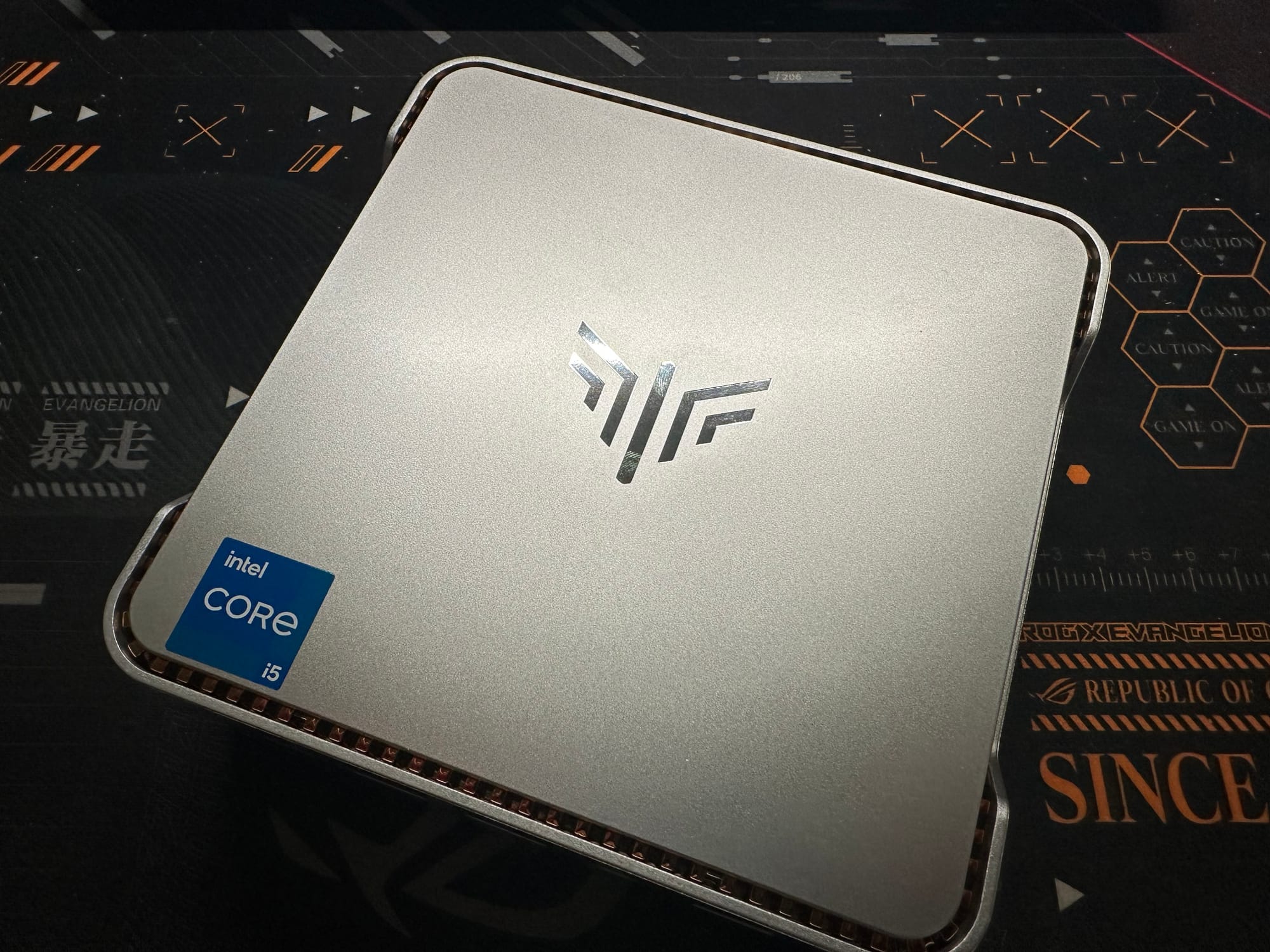
The mini PC market continues to push the boundaries of compact computing, and today I'm examining Kamrui's latest offering built around Intel's 14th generation i5-14450HX processor. At approximately $500, this system pairs a capable hybrid-architecture CPU with budget-oriented supporting components, a combination that raises questions about where this product fits in an increasingly competitive landscape. Let's see whether the processing power justifies the price of admission.
Disclosure: This review reflects my honest, independent assessment of the product. Some links in this article are Amazon affiliate links, meaning I may earn a small commission at no additional cost to you if you purchase through them. This does not influence my opinions or recommendations. All benchmarks were conducted on hardware I purchased or received for review purposes.
Code: V5B6ZYBF
System Configuration
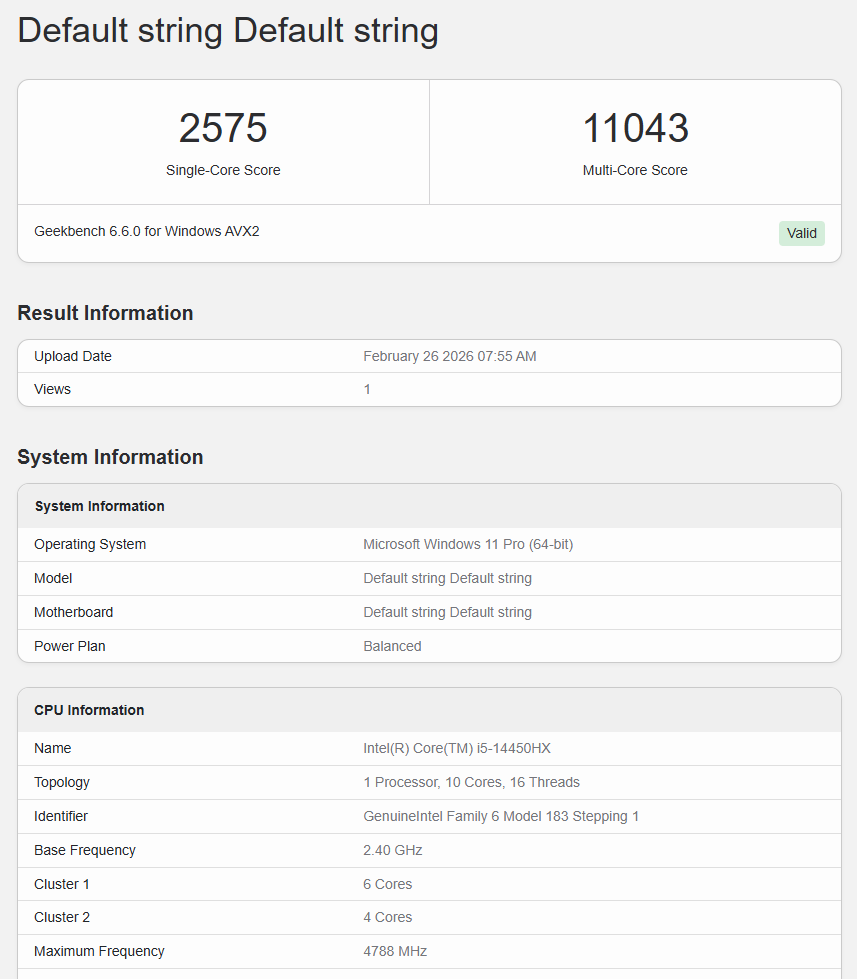
Processor: Intel Core i5-14450HX (10C/16T, 6P+4E, up to 4.8 GHz)
Memory: 32GB DDR4-3200 SO-DIMM
Graphics: Intel UHD Graphics (integrated)
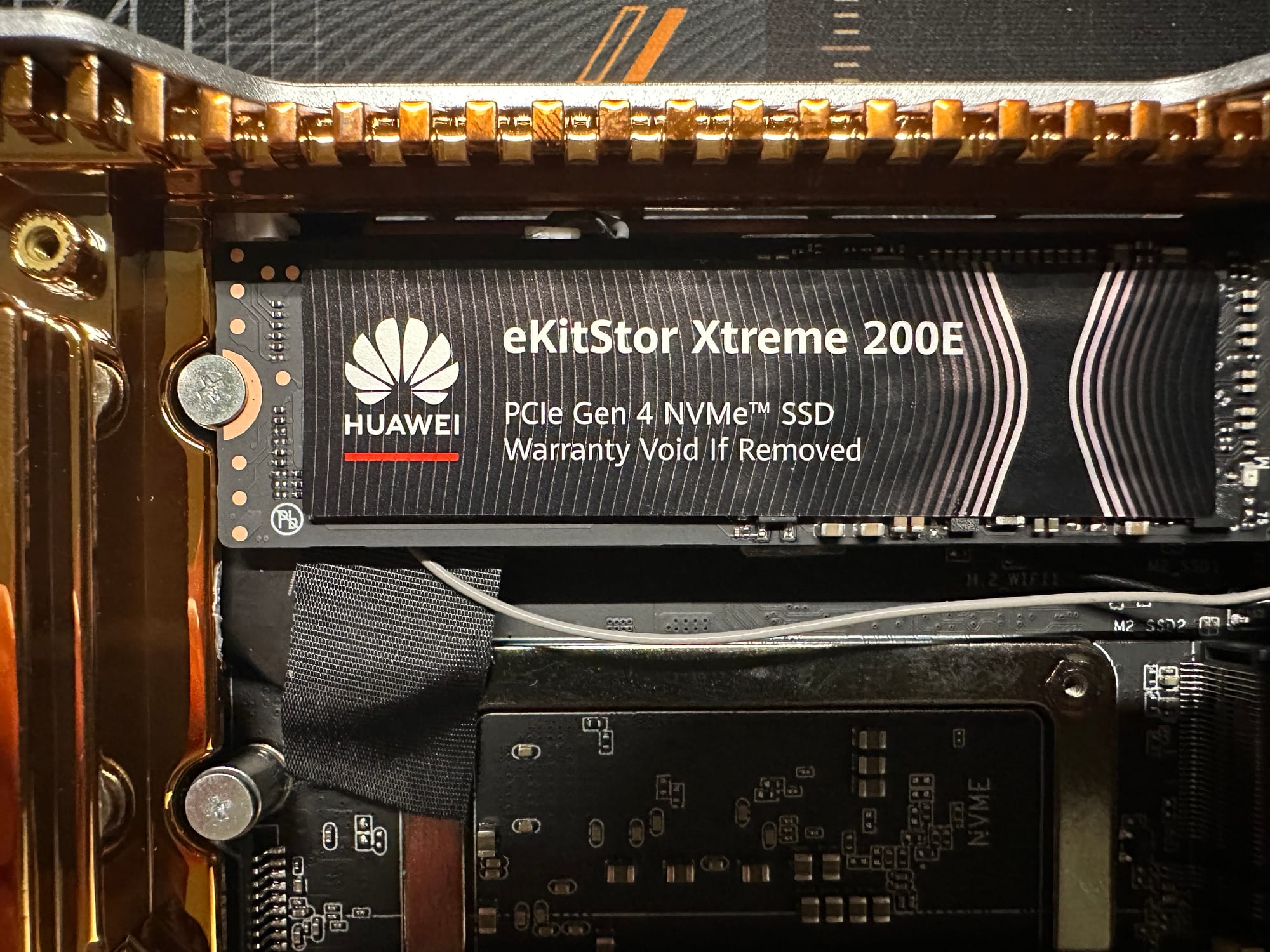
Storage: 1TB PCIe Gen 4 x4 NVMe 2.0 SSD (DRAMless, QLC)
Networking: Realtek RTL8852BE Wi-Fi 6 (2.4/5 GHz), Realtek RTL8111 Gigabit Ethernet
Power Limits: PL1 54W / PL2 65W (factory settings)
Power Consumption: ~20W idle / 94W maximum system draw (all-core load, during PL2)
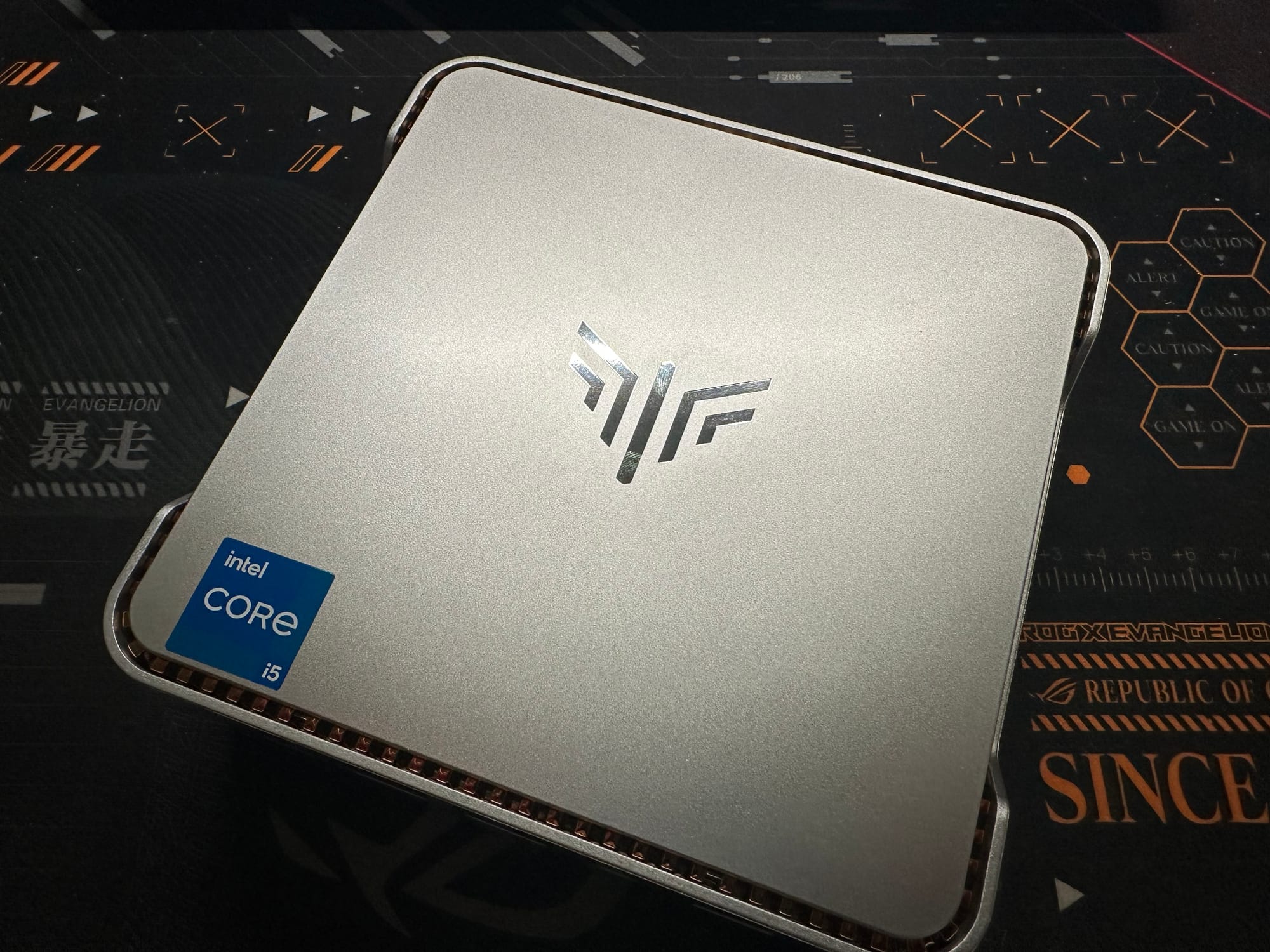
The Intel i5-14450HX in Context
The i5-14450HX belongs to Intel's 14th generation Core lineup, code-named Raptor Lake Refresh, which launched for mobile platforms in early 2024. The "Refresh" designation is telling: this generation was, by Intel's own admission, an iterative update rather than a fundamental redesign, carrying forward the same Raptor Lake architecture that debuted in the 13th generation with only minor clock speed bumps and optimization refinements.
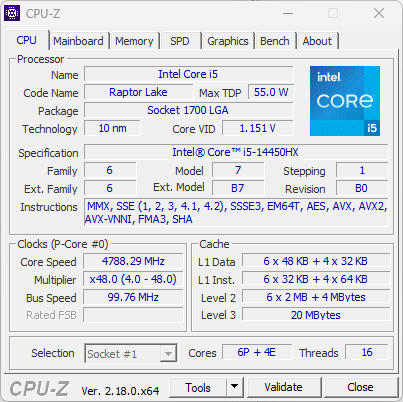
The "HX" suffix designates Intel's highest-performance mobile tier: processors that are essentially desktop dies repackaged in a mobile BGA form factor. This approach gives HX chips access to more cores and larger caches than their H-series counterparts, but it comes with a significant trade-off that proves central to this review: integrated graphics. Where Intel's H and U-series mobile processors receive purpose-built GPU silicon with more execution units and multiple media engines, HX chips inherit the desktop die's severely cut-down Intel UHD Graphics. For a processor destined for mini PCs where discrete GPUs aren't an option, this is not just a compromise; it's the defining limitation of the platform, and the benchmarks in the Graphics Performance section below make the extent of that limitation painfully clear.
The 14th generation will likely be remembered as much for its controversy as its performance. While the widely reported instability issues, caused by excessive voltage and oxidation degradation, primarily affected high-end desktop K-series processors (the i9-13900K/14900K and i7-13700K/14700K), the fallout cast a shadow over the entire product family. The i5-14450HX, operating at far more conservative power levels in a mobile package, was not meaningfully affected by these issues, but the reputational damage to the generation was already done.
Architecturally, the 14th generation represents the end of an era. It was the last Intel lineup built on the traditional monolithic Core architecture before Arrow Lake introduced a chiplet-based design with entirely new core microarchitectures. In hindsight, Raptor Lake Refresh served as a holding pattern, keeping Intel competitive while the company prepared its more ambitious next-generation designs.
The i5-14450HX itself occupies an interesting niche. Its 10-core, 16-thread configuration (6 Performance cores with Hyper-Threading, 4 Efficiency cores without) actually matches the thread count of Intel's former flagship i9-11900H while adding two additional physical cores, a vivid illustration of how quickly core counts have escalated. The hybrid P-core/E-core design allows the processor to balance high-performance workloads with power-efficient background tasks, a meaningful advantage for mini PC use cases where thermal headroom is limited.
For buyers in 2026, the i5-14450HX sits in a transitional space: powerful enough to handle demanding workloads, but part of a generation that never fully escaped the shadow of its predecessor's reputation or the anticipation of its successor's architectural leap.
Port Layout and Connectivity
This system shares the familiar Kamrui Hyper chassis with a port layout that covers the essentials, though with some notable specification differences from higher-end configurations in the same family.
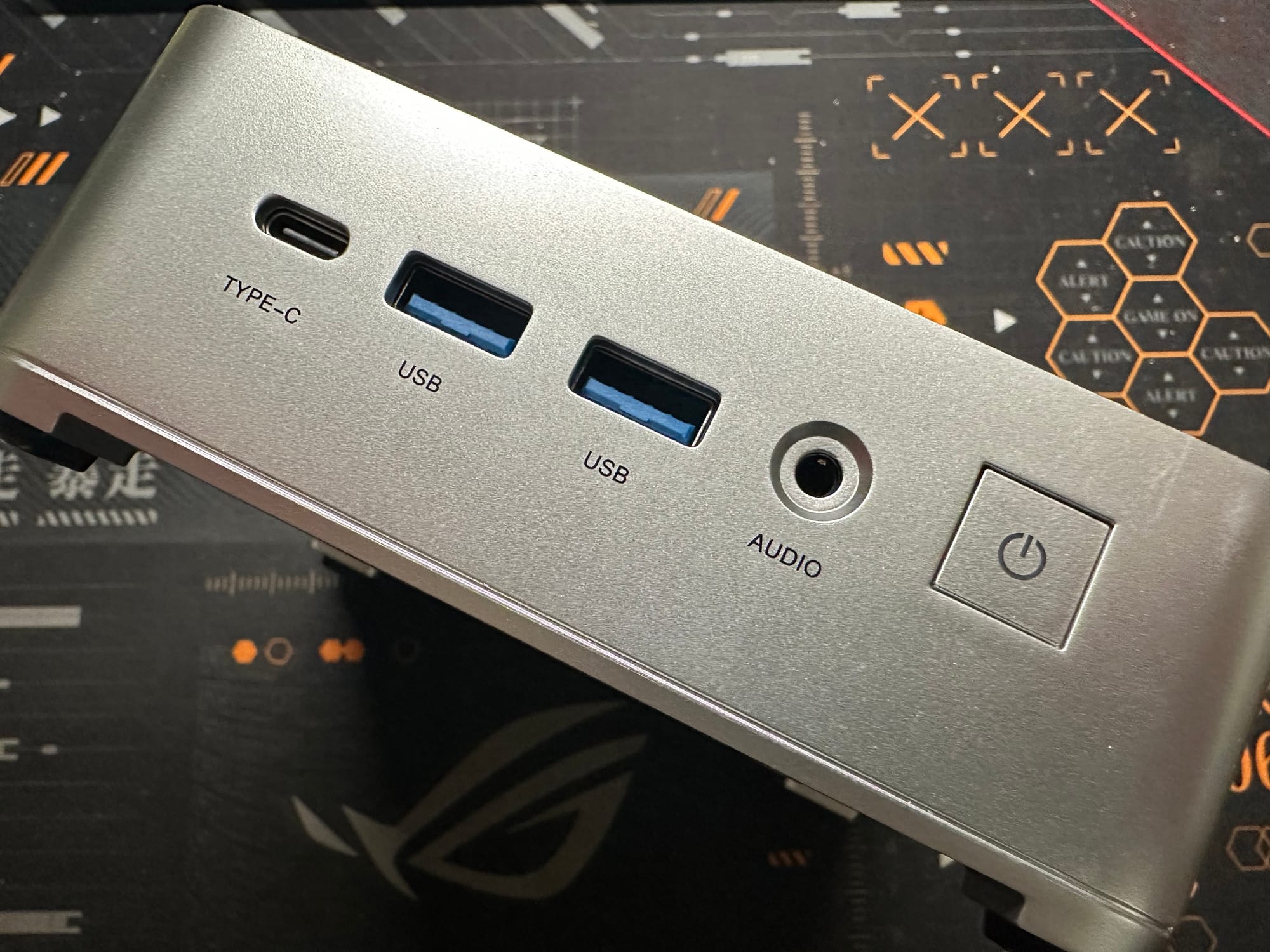
Front Panel:
- 2x USB 3.2 Gen 2 Type-A ports (10 Gbps)
- 1x USB 3.2 Gen 2 Type-C port (10 Gbps)
- 3.5mm combination audio jack
- Power button with LED indicator
Rear Panel:
- 4x USB 3.2 Gen 1 Type-A ports (5 Gbps)
- 1x HDMI output
- 1x DisplayPort
- Gigabit Ethernet port (RJ45)
- DC power input
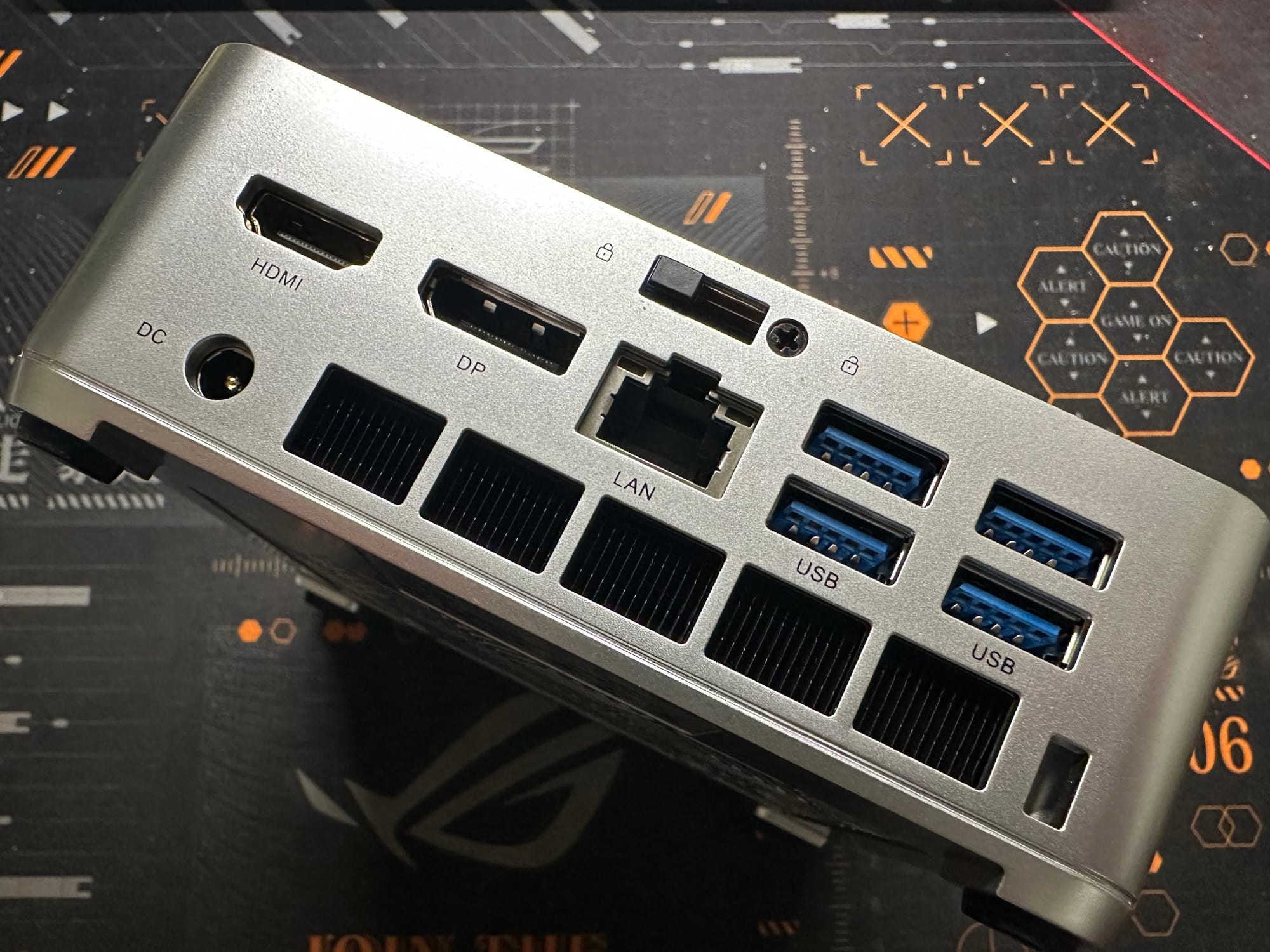
The dual-display capability through HDMI and DisplayPort supports multi-monitor productivity setups, though the integrated UHD graphics will be the bottleneck for resolution and refresh rate combinations rather than the display outputs themselves.
The front panel offers a strong connectivity selection, with both USB-A and USB-C ports running at 10 Gbps, fast enough for external NVMe enclosures and other high-bandwidth peripherals without reaching for a rear port. The four rear USB 3.2 Gen 1 Type-A ports at 5 Gbps are perfectly adequate for keyboards, mice, webcams, and other peripherals that don't demand high throughput.
The most notable specification shortcoming is the Ethernet port, limited to Gigabit speeds via a Realtek RTL8111 controller. In a market where 2.5GbE has become standard even on budget mini PCs, this is a conspicuous omission, and one with lasting consequences discussed in the Value Proposition section below.
As with previous Kamrui Hyper models, there is no Thunderbolt support. The USB-C port provides standard USB 3.2 Gen 2 functionality only, ruling out high-performance eGPU enclosures or Thunderbolt-dependent peripherals.
Expandability and Internal Storage Options
On a more positive note, this mini PC retains the dual M.2 NVMe slot configuration that makes the Kamrui Hyper chassis appealing to tinkerers and homelab enthusiasts. One slot comes occupied by the included 1TB drive, leaving the second available for expansion. Two SO-DIMM RAM slots provide memory flexibility for future upgrades.
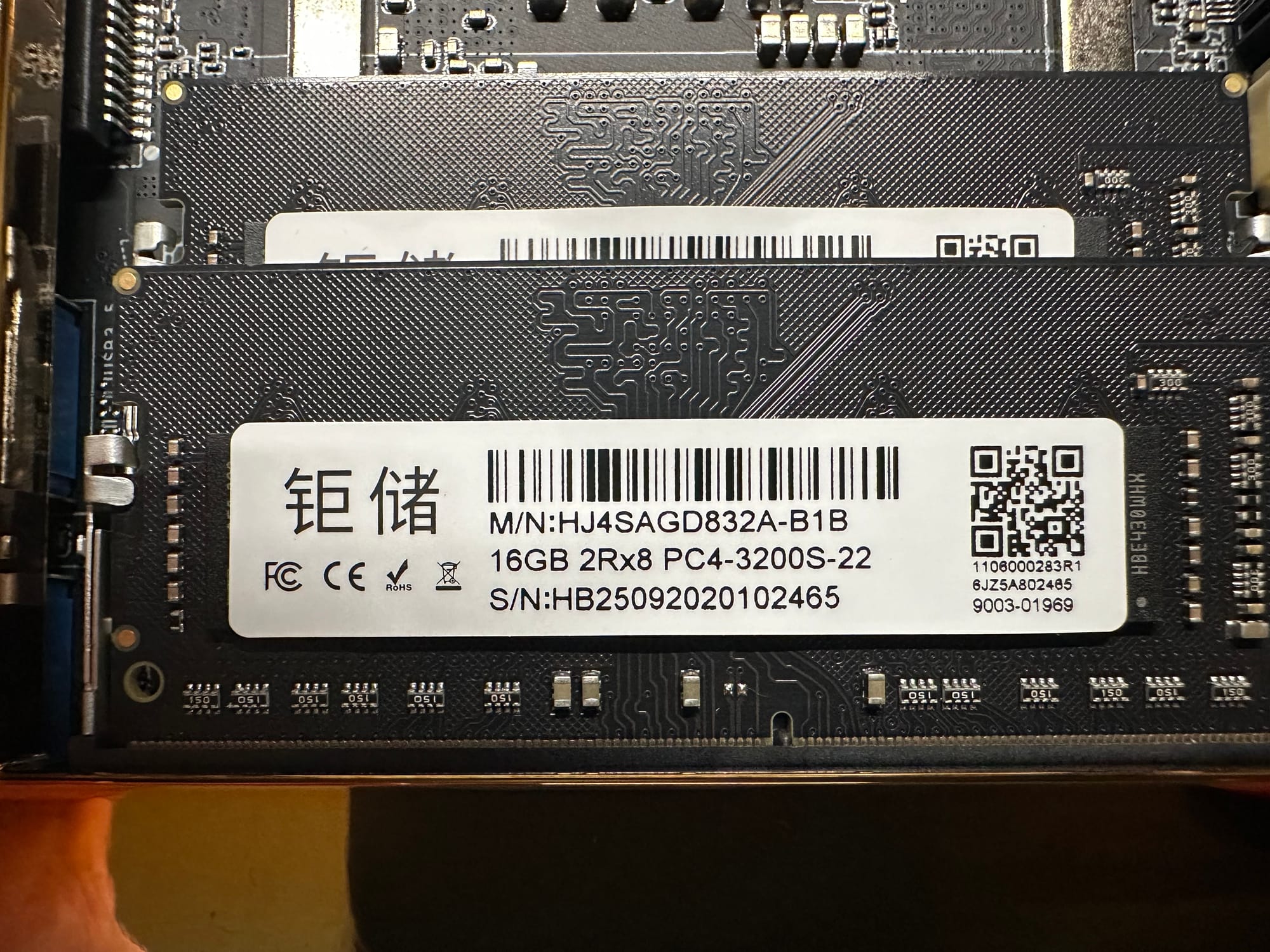
The second M.2 slot opens the same range of possibilities covered in previous reviews of this chassis: additional NVMe storage for OS/data separation, M.2-to-SATA HBA adapters for connecting additional drives, specialized expansion cards for extra network interfaces, or AI accelerators like the Google Coral TPU. This expandability remains a genuine differentiator and gives the system room to evolve with changing use cases over time.
Performance Analysis
CPU Performance
The i5-14450HX is clearly the star of this configuration, and the benchmarks confirm it. Geekbench 6 returned a single-core score of 2575 and a multi-core score of 11043, a substantial generational leap over the i9-11900H's scores of 2225 and 8408 respectively. The 16% single-threaded improvement reflects architectural refinements and clock speed advantages, while the 31% multi-threaded gain demonstrates the benefit of the hybrid design's additional physical cores.
Cinebench 2026 testing yielded 442 points single-threaded and 2743 points multi-threaded. The multi-threaded result is particularly strong, showcasing the hybrid architecture's ability to leverage all ten cores effectively under sustained workloads. The single-threaded score confirms competitive per-core performance that translates directly to snappy application responsiveness.
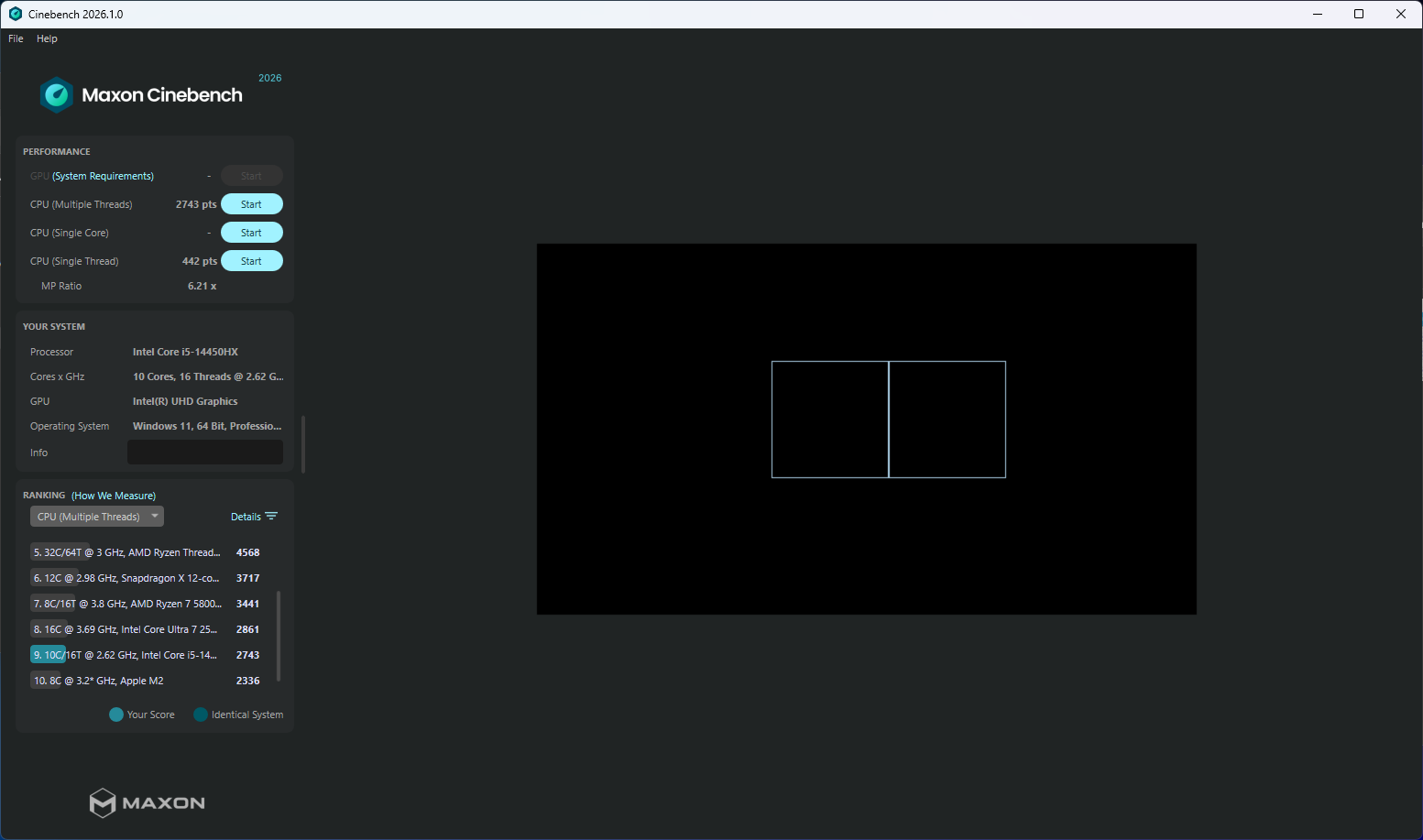
These results position the i5-14450HX as a genuinely capable processor for productivity, content creation, and computational tasks. The "i5" branding undersells what is, by any historical measure, a powerful chip. Its 10 cores and 16 threads match or exceed flagship processors from just a few generations ago.
Graphics Performance
If the CPU is this system's strength, the integrated graphics are its Achilles' heel, and perhaps the single most important factor in evaluating this mini PC's value proposition.
Geekbench 6 returned an OpenCL compute score of 4027 and a Vulkan score of 4623. For context, the older i9-11900H achieved an OpenCL score of 7334, nearly double. The i9-13900HK, built on the same Raptor Lake architecture but using the proper mobile die with Iris Xe and 96 execution units, scored 14730 in OpenCL, nearly 3.7 times the 14450HX's result. The Heaven Benchmark painted an even starker picture: 26.8 FPS with a score of 675, compared to 47.2 FPS for the i9-11900H and 68 FPS for the i9-13900HK. Perhaps most damning of all, AMD's budget Ryzen 5 7430U (a rebranded 5600U with the aging Vega 7 iGPU) scores 8468 in Geekbench 6 OpenCL, more than double the 14450HX's result, even when hamstrung by single-channel RAM.
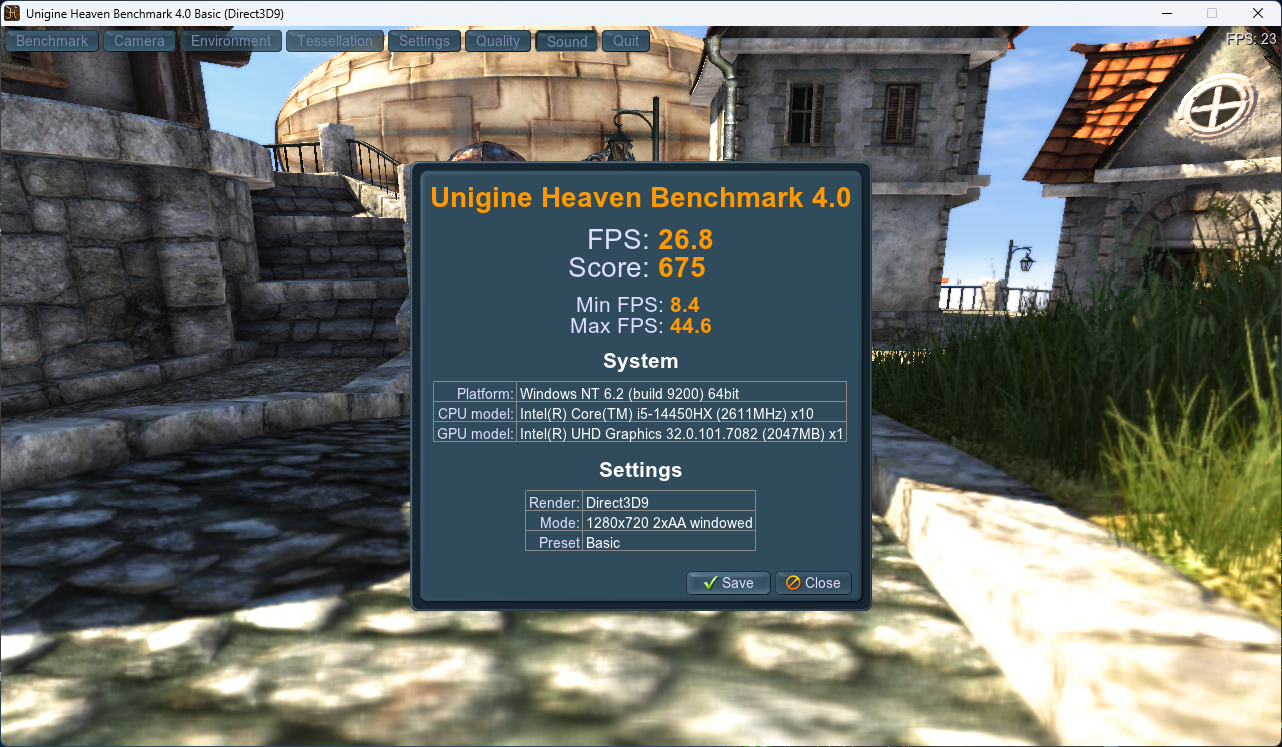
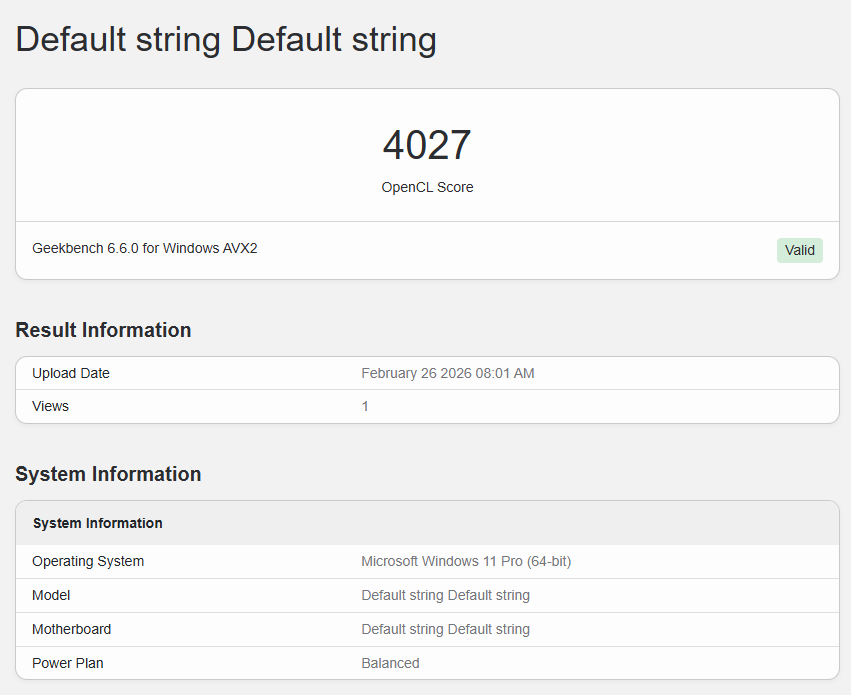
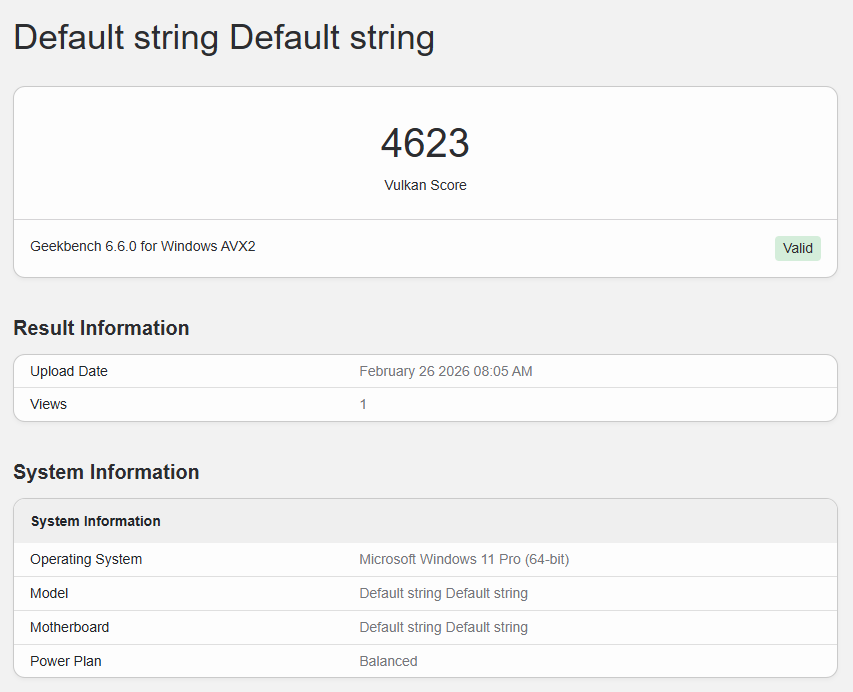
The root cause is architectural. The i5-14450HX's desktop-derived die carries just 16 compute units and a single media engine. For comparison, Intel's own budget N150 processor has 24 compute units despite targeting sub-$200 systems, and the Iris Xe found in mobile Raptor Lake chips like the i9-13900HK has 96 execution units with dual media engines. The 14450HX's iGPU isn't just weaker than its competitors; it's weaker than Intel's own entry-level silicon. The single media engine also limits hardware-accelerated video transcoding throughput, undermining what would otherwise be a natural use case for a mini PC with a powerful CPU.
In practical terms, this system is inadequate for anything beyond the most basic GPU-accelerated tasks and light media playback. Even older emulators and esports titles that ran acceptably on the i9-11900H's integrated graphics will struggle here. For a $500 system, this is a difficult limitation to overlook.
Storage Performance
The 1TB PCIe Gen 4 x4 NVMe 2.0 SSD delivers the expected upgrade over the previous generation's Gen 3 drive, at least in sequential workloads. CrystalDiskMark 9 sequential performance (Q1T1) reached 3842 MB/s read and an impressive 4816 MB/s write, benefiting from the Gen 4 interface's higher bandwidth ceiling.
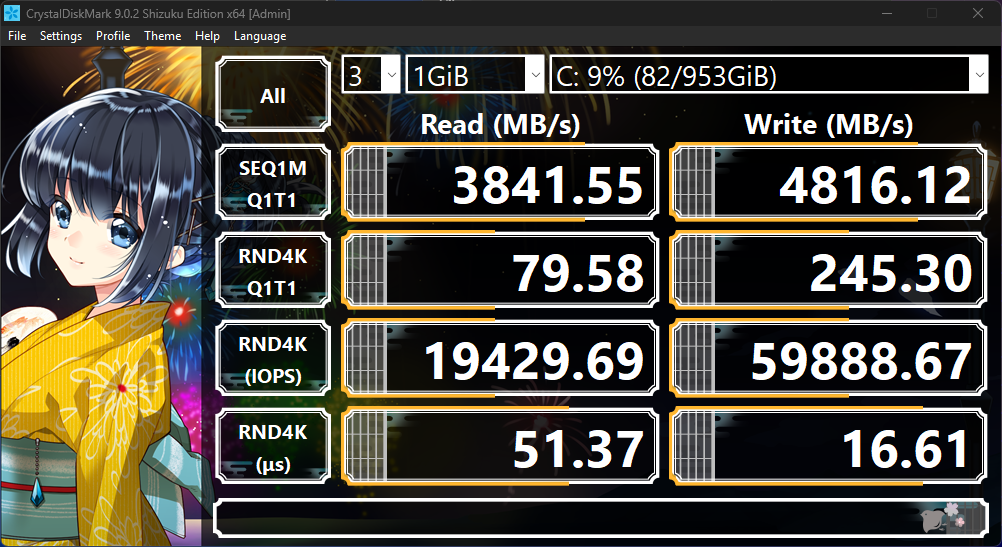
Random 4K performance (Q1T1), the metric that most closely correlates with real-world system responsiveness, came in at 80 MB/s read and 245 MB/s write, with corresponding IOPS of 19,430 read and 59,889 write and latency figures of 51 microseconds read and 17 microseconds write. These numbers represent a measurable improvement over the previous system's Gen 3 QLC drive (59/123 MB/s read/write at Q1T1), particularly on the write side where SLC caching likely contributes to the strong showing.
Users will still encounter occasional hesitation during heavy random-read workloads (application launches, OS file operations, database queries) but the overall storage experience should feel incrementally snappier than budget Gen 3 alternatives. The write-side improvements are more meaningful, suggesting this drive handles sustained mixed workloads more gracefully than its predecessor.
Power Consumption
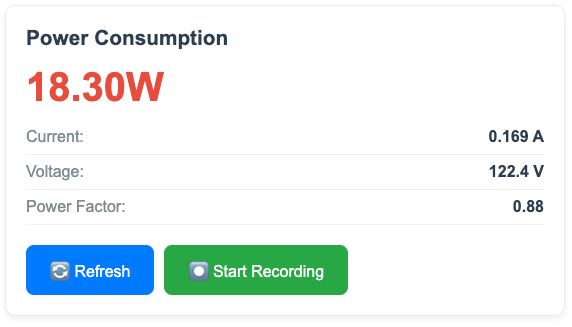
Power consumption reveals an interesting profile shaped by the factory power limits. Idle draw of approximately 20W matches the i9-11900H system, making it equally suitable for 24/7 operation, roughly $2-3 per month in electricity at typical residential rates for always-on use.
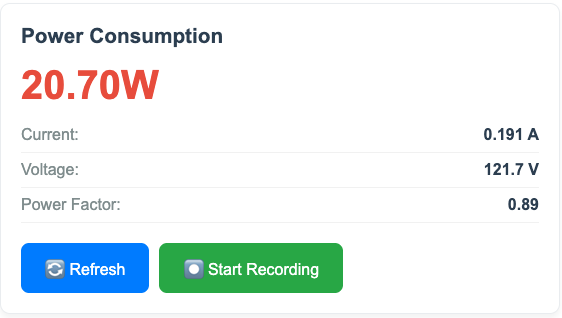
The factory power limits are set at PL1 54W and PL2 65W. During all-core stress testing, total system draw peaked at 94W while PL2 was active, then settled lower once the processor dropped to its PL1 sustained limit of 54W. This is a notably conservative configuration for an HX-class processor: Intel rates the i5-14450HX for up to 157W maximum turbo power, meaning this mini PC allows less than half of the chip's rated power budget. The chassis cooling and power delivery simply aren't designed to sustain more.
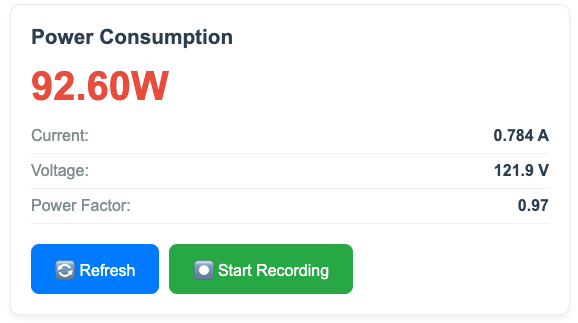
For context, the i9-13900HK in the AceMagic M1 tells a similar story: that system peaks at 99.5W before settling to 75W sustained once PL2 expires. Both systems force their flagship-class processors to operate well below their rated power envelopes, a common reality in mini PC form factors where thermal headroom is limited. The 14450HX's strong multi-threaded benchmark results despite the 54W sustained limit suggest efficient use of its hybrid architecture, getting meaningful work done per watt rather than relying on brute-force power draw.
Typical workloads will land well below even the PL1 ceiling.
Noise
The Kamrui Hyper earns good marks here. Under daily workloads like web browsing, document editing, and video calls, the fan is barely perceptible. It spins, but at speeds low enough that most users won't notice it over ambient room noise.
Under sustained load, the fan ramps up but remains well-mannered. The acoustic character is a gentle swoosh with little whine or hum, the kind of broadband noise that blends into the background rather than demanding attention. It's not silent, but it's not distracting either. Compared to the AceMagic Kron K1 with the 7430U, which needed aggressive fan speeds to cope with its undersized thermal solution, the Kamrui Hyper's cooling system is clearly better matched to its processor's power envelope, even if that envelope is conservatively limited by the 54W PL1.
For office environments, living rooms, or anywhere noise matters, this system won't be a nuisance. It's one of the few areas where the Kamrui Hyper delivers without reservation.
Use Case Recommendations
The i5-14450HX's performance profile (strong CPU, weak GPU, budget peripherals) channels this system toward specific use cases more narrowly than its price might suggest:
Productivity Workstation: This is where the system makes its strongest case. The 10-core, 16-thread processor handles office suites, web browsing, video conferencing, and multitasking with genuine authority. If your workday consists of dozens of browser tabs, productivity applications, and background tasks, the CPU won't leave you waiting.
Development Environment: Software development, containerized workflows, and virtual machines benefit directly from the core count and 32GB of RAM. Compilation, testing, and running local development servers are squarely within this processor's comfort zone.
Home Server (with significant caveats): The capable CPU and 20W idle power make this viable for file serving and home automation. However, the soldered GbE controller caps local transfers at ~110 MB/s, and the iGPU's single media engine constrains hardware-accelerated transcoding throughput for Plex or Jellyfin. For dedicated media server duty, the i9-13900HK with Iris Xe and 2.5GbE is a far better fit despite the higher price.
Light Content Creation: Photo editing and 1080p video editing are workable, though the weak integrated graphics will extend GPU-accelerated render times noticeably compared to systems with Iris Xe or discrete graphics.
Gaming: Look elsewhere. The integrated UHD graphics make this a poor choice for any gaming beyond the most undemanding titles. Even retro emulation and esports titles that ran acceptably on the i9-11900H's integrated graphics are compromised here.
Value Proposition
At approximately $500, this is a hard sell, though the current market context explains, if not fully justifies, the pricing.
The RAM and storage markets in early 2026 have made budget system building painful. DDR4 SO-DIMM pricing has climbed to eye-watering levels: off-brand 16GB modules now run around $110, with name-brand options like Kingston FURY at $119 or Corsair Vengeance at $132 per stick. At current street prices, the included 32GB of DDR4-3200 alone represents $220-260 of the system's cost depending on the modules used. NVMe storage tells a similar story: even a budget-tier drive like the Crucial P310 commands $130 for 1TB. Between memory and storage, roughly $350-400 of this system's $500 asking price may be accounted for by components alone, before factoring in the processor, motherboard, chassis, cooling, power supply, and networking hardware.
This market reality makes the $500 price tag more understandable from a bill-of-materials perspective. Kamrui isn't necessarily gouging buyers so much as passing along inflated component costs. But understanding the price doesn't make the purchase decision any easier. Buyers are still spending $500 on a system where the expensive components are adequate but uninspiring (QLC flash rated for just 400 TBW, DDR4-3200), and where the remaining budget was clearly stretched thin for everything else. To be fair, DDR4 is the right call here: Raptor Lake runs perfectly well on DDR4-3200, and with an iGPU this weak, DDR5's extra bandwidth has nowhere useful to go. Spending more on faster memory would only inflate the price without meaningful benefit.
The saving grace is that the most inflated components are also user-replaceable. When prices normalize, buyers can swap in better DDR4 memory and replace the 400 TBW QLC drive with a proper TLC SSD. The Realtek 8852BE Wi-Fi 6 module sits in a standard M.2 E-key slot, ready to be swapped for a Wi-Fi 7 card when prices come down. The real frustration is the one component that can't be changed: the soldered Realtek RTL8111 GbE controller. Budget mini PCs costing significantly less routinely include 2.5GbE, and the RTL8111 is a conspicuously cheap part on a board that could have accommodated a Realtek RTL8125 2.5GbE solution for a marginal cost increase. This is where Kamrui should have spent the extra dollar or two. The Ethernet controller will limit this system for its entire lifespan, and it's the one upgrade buyers can never make.
The competitive picture becomes clearest when comparing the 14450HX against systems I've previously reviewed in adjacent price brackets.
Below it, the AceMagic Kron Mini K1 with AMD's Ryzen 5 7430U sells for $340. That system includes Wi-Fi 6E (which the $500 14450HX lacks), and its aging Vega 7 iGPU still scores 8468 in Geekbench 6 OpenCL, more than double the 14450HX's 4027. In the Heaven benchmark, the 7430U with a dual-channel RAM upgrade reaches 62.4 FPS, over twice the 14450HX's 26.8 FPS. The 7430U can't match the 14450HX's multi-threaded CPU performance, but for office productivity, the cheaper system handles everything a typical user needs at 60% of the cost, with better wireless connectivity as a bonus.
Above it, the AceMagic M1 with Intel's i9-13900HK sells for around $749. Built on the same Raptor Lake architecture but using the proper mobile die, the 13900HK includes Iris Xe graphics (14730 OpenCL, 68 FPS in Heaven), 2.5GbE, Wi-Fi 6E, and idles at just 14.2W. For the homelab and media server use case where overpowered mini PCs find their niche, the 13900HK is dramatically better suited: its Iris Xe with dual media engines is a genuine transcoding asset, and 2.5GbE doesn't bottleneck local network transfers. The 14450HX actually beats the 13900HK in multi-threaded CPU by 22% (Geekbench 6 MT: 11043 vs 9030), a surprising result likely explained by both systems being power-limited in their compact chassis: the 14450HX sustains at PL1 54W, while the 13900HK settles to 75W system draw, meaning both CPUs operate at similar actual power levels where the 14450HX's newer stepping and optimization squeeze out more performance per watt. But that CPU advantage is the only metric where the cheaper system wins.
The 14450HX sits uncomfortably between these two. It costs $160 more than the 7430U but delivers worse graphics. It costs $249 less than the 13900HK but lacks the networking, iGPU capability, and power efficiency that make the more expensive system compelling for server workloads. Both competitors include Wi-Fi 6E; the 14450HX does not. Every manufacturer faces the same inflated RAM and storage costs, so the component market doesn't explain why the 14450HX's surrounding hardware is weaker than systems both above and below its price point.
The uncomfortable truth is that the current memory and storage market has made $500 mini PCs worse values across the board, but this particular configuration feels the squeeze more than most, because its one strength (CPU performance) and its many weaknesses (everything else) are so sharply divided. In a more favorable component market, this system at $350-400 would tell a very different story.
The Elephant in the Room: Apple Mac Mini M4
Any $500 mini PC review in 2026 has to acknowledge the Apple Mac Mini M4, which starts at the same price with 16GB of unified memory and 256GB of storage. On paper, the Kamrui offers more RAM (32GB vs 16GB) and significantly more storage (1TB vs 256GB). In the current market where those components are inflated, that's not nothing.
But the M4 chip is a fundamentally more balanced piece of silicon. Its GPU is not an afterthought bolted onto a desktop CPU die; it's an integral part of the SoC designed to work in concert with the CPU and a unified memory architecture that gives both compute and graphics full access to the available bandwidth. The M4's GPU capabilities are in a different league from the 14450HX's 16-CU UHD Graphics, delivering real graphical horsepower for video editing, photo work, light 3D tasks, and even casual gaming. The M4 also idles at a fraction of the 14450HX's 20W, and its single-threaded CPU performance is competitive.
If I had to choose one over the other at $500, I would take the Mac Mini. The 14450HX wins on raw multi-threaded CPU throughput and raw storage/memory capacity, but the M4 wins on GPU performance, power efficiency, build quality, display output flexibility, and overall system balance. For the majority of users buying a $500 desktop computer for general-purpose use, the Mac Mini is the more sensible purchase. The Kamrui's advantages only matter if you specifically need 32GB of RAM and 1TB of storage on day one, require Windows or Linux compatibility, or if your workload is heavily multi-threaded and completely GPU-agnostic. The Kamrui Hyper's dual M.2 slots and standard SO-DIMM memory do provide genuine flexibility that Apple's sealed ecosystem cannot match, but it's a narrow advantage against a formidable competitor.
The Windows 11 Out-of-Box Experience
A review of the hardware wouldn't be complete without addressing the software experience, because Windows 11 does this system no favors.
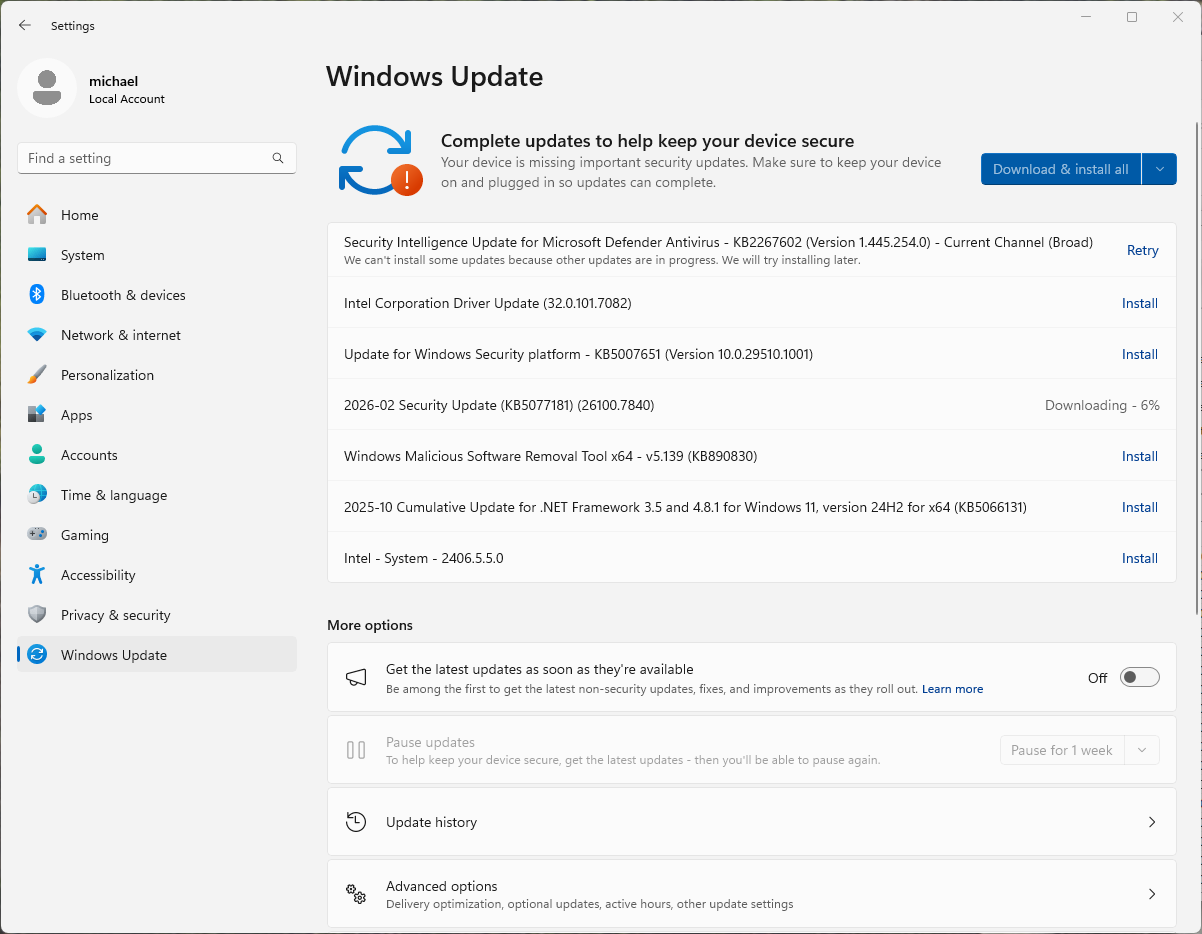
Upon first boot and connecting to the internet, Windows immediately began downloading and installing updates. This is expected behavior for any new PC, but the scale of the disruption was remarkable: the update process consumed nearly two hours, during which the processor was heavily occupied servicing Windows Update, Windows Defender definition downloads, driver installations, and background indexing, all competing for resources simultaneously. During this period, the system was sluggish to the point of being nearly unusable. Applications were slow to launch, the UI stuttered, and attempting any productive work felt like fighting the operating system for control of the hardware.
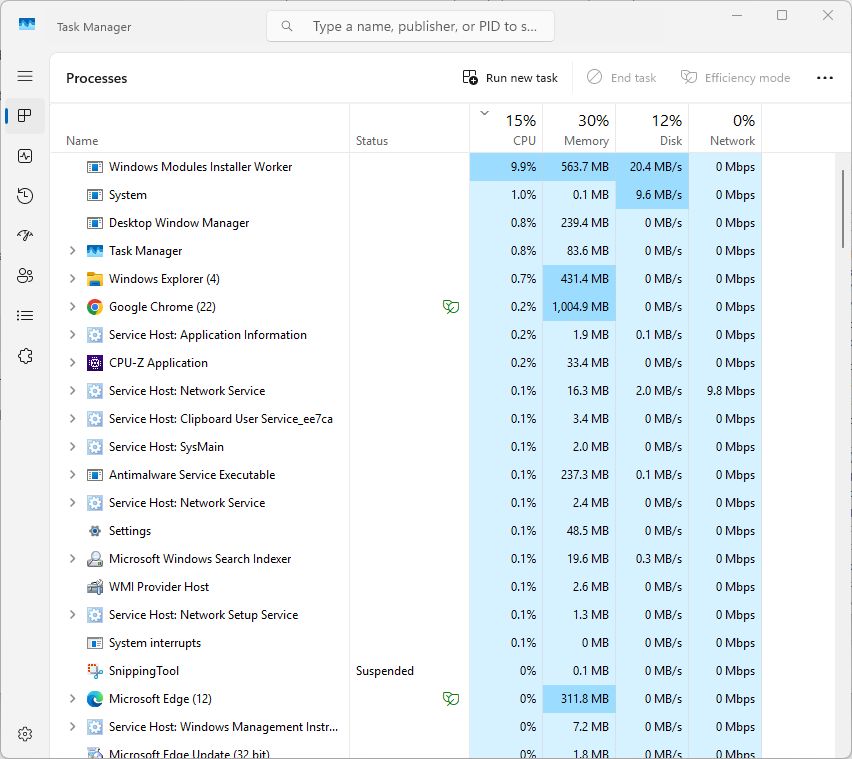
This is not a problem unique to the Kamrui Hyper, and it's not Kamrui's fault. Every new Windows 11 machine endures this ritual. But it's worth noting because the first impression of any PC is shaped by its out-of-box experience, and Windows 11 makes that first impression actively unpleasant. A buyer who just spent $500 on a system marketed for its capable processor will spend their first two hours watching that processor churn through updates instead of doing anything useful. The irony of a 10-core, 16-thread processor being brought to its knees by its own operating system's maintenance routines is not lost on anyone who has been through the experience.
By contrast, the Mac Mini M4 at the same price boots to a usable desktop in minutes and handles its updates in the background without noticeable performance degradation. This is an ecosystem-level advantage that no amount of hardware specification can overcome, and it's one more factor tilting the value equation away from Windows-based mini PCs at this price point.
Once the updates complete and the system settles, the 14450HX performs as the benchmarks suggest: snappy for productivity, responsive for multitasking, and perfectly adequate for daily computing. But getting to that steady state requires patience that the out-of-box experience doesn't earn.
A Better Story on Linux
After completing Windows-specific testing, I wiped the drive and installed CachyOS, an Arch-based distribution optimized for performance. The contrast with the Windows experience was immediate.
The CachyOS installer detected and configured all hardware out of the box. Both the Realtek RTL8852BE Wi-Fi chip and the RTL8111 Gigabit Ethernet controller had native Linux drivers, requiring zero manual intervention. No hunting for driver packages, no rebooting into a half-configured system, no waiting for Windows Update to find the right components. The system went from bare metal to a fully functional desktop in a fraction of the time Windows demanded, and without the two-hour update hostage situation.
A quick Geekbench 6 run under CachyOS returned a single-core score of 2154 and a multi-core score of 11176. The multi-core result is slightly higher than the Windows figure of 11043, while the single-core score dipped from 2575 to 2154. The differences are minor and likely attributable to scheduler behavior and kernel-level tuning rather than any fundamental performance gap. What matters more than the numbers is how the system feels: responsive, snappy, and unburdened by the background telemetry, indexing, and update machinery that defines the modern Windows experience.
For Linux users, particularly those eyeing this system for server, Docker, or development workloads, the hardware compatibility story is encouraging. Full driver support without kernel patching or third-party modules means this system works as a plug-and-play Linux box. A headless Linux server doesn't care about its 16 GPU compute units, and without Windows' background overhead, the 14450HX's CPU gets to do what it does best: work.
Conclusion
The Kamrui Hyper i5-14450HX presents a genuine identity crisis. Its processor punches well above what the "i5" branding suggests, delivering the best multi-threaded performance in its competitive set. The noise profile is pleasant, the dual M.2 expandability is welcome, and the upgradeable RAM, storage, and Wi-Fi module give buyers a path to improve the system over time.
But at $500, the package around that processor doesn't hold up. The cut-down iGPU loses to every competitor tested, including a $340 AMD system. The soldered GbE controller is a permanent limitation on a board that could have had 2.5GbE for pennies more. And the Windows 11 out-of-box experience wastes the first two hours of ownership. Against the Mac Mini M4 at the same price, the 14450HX's advantages narrow to raw multi-threaded CPU throughput, more RAM, and more storage, meaningful for some buyers, but not most.
Where this system finds its purpose is running Linux. Strip away Windows, install CachyOS or a similar lean distribution, and the 14450HX becomes a responsive, well-supported workhorse for the CPU-heavy, graphics-agnostic roles it was inadvertently designed for. The soldered GbE remains the lasting regret, but for workloads that don't saturate a gigabit link, this is a capable platform with room to grow.
Final Recommendation: A difficult sell under Windows at $500, but a genuinely capable Linux box for the right workload. If your use case is CPU-intensive and graphics-agnostic (compilation, containers, home automation), and you're willing to wipe the drive and run Linux, the 14450HX delivers real value. For general-purpose desktop computing, the Mac Mini M4 is the better $500 spent. For server duty, the i9-13900HK with Iris Xe and 2.5GbE remains the better tool for the job despite the higher price. The i5-14450HX's CPU is excellent; it just needs the right software and the right expectations to shine.
Code: V5B6ZYBF